Marketing consent, and blocking a contact
A broadcast only reaches people who agreed to marketing. Blocking takes somebody out of your active inbox.
Quick start
- Open the contact panel, on the web or on the app, and find Marketing consent.
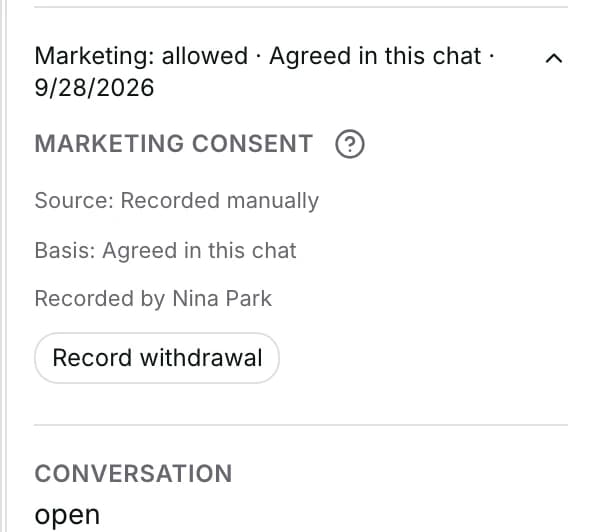
- On the web, click the line to open it and read Source, plus Basis and who recorded it when known.
- To allow marketing, choose how the customer agreed — for example Agreed in this chat.
- To stop it, click Record withdrawal instead. The customer is sent nothing either way.
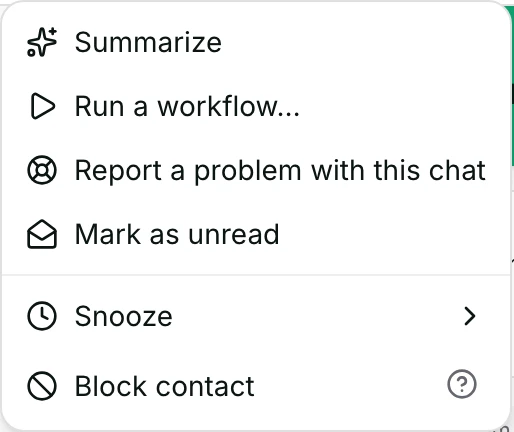
- Owners, admins and agents can do both. To block, use the conversation menu's Block contact.
Watch out
- Blocking does not stop a broadcast. Record a withdrawal as well if they must not receive one.
- A completed data-deletion request is permanent. Consent cannot be switched back on for that person.
Details
Getting here
The contact panel or the full profile → the Marketing consent line near the bottom of Details. Blocking is in the conversation header's ⋯ menu. On the app: open the contact → the Marketing consent block; to block, open the conversation's menu and pick Block contact, which asks Block this contact? first.
Before you start
- Owners, admins and agents can record consent, record a withdrawal, and block. A viewer sees the summary and no buttons.
- Consent is recorded per person, with who recorded it, when, and what the customer actually did.
- Consent is never taken from an import file and never inferred from a purchase. It is recorded by a teammate, by the customer tapping a consent button, or by a connected system that reports what the customer agreed to.
Fields
- Marketing: allowed · {label} · {date}
- They may receive a broadcast. The label is what they did, or where the value came from.
- Marketing: not allowed · no consent recorded
- Nobody has recorded anything, so they are out of every broadcast.
- Marketing: not allowed · withdrawn on {date}
- They asked to stop, and they stay out.
- Agreed in this chat
- They said yes in the conversation.
- Said yes (call / in person)
- They said yes out loud.
- Sent a screenshot
- They sent proof.
- Signed a form
- You hold a signed form.
- Record withdrawal
- They asked to stop.
- Limits: Recorded as Customer asked to stop.
How it works
- The line is always on screen, in the panel and on the app.
- On the web, opening it shows Source, plus the Basis and Recorded by when they are known. Until they opt in, it also carries the reminder Broadcasts to this contact are blocked until they opt in (PDPA).
- The app's block does not open. When consent is allowed, its summary names the basis, or the source if no basis is known. It also shows Recorded by and the buttons, but no PDPA reminder.
- Source says where the value came from: Recorded manually, Bulk import, Inferred: customer messaged first, Customer used an opt-out keyword, Customer tapped a button, Reported by integration, or Source not recorded.
- Bulk import means an old bulk change made on the contacts list, not a file you uploaded.
- Basis is the stronger fact — what the customer actually did — and the summary prefers it over the source when both are known.
- Recording consent writes two things at once: an entry that is never overwritten, and the person's current state. They cannot come apart.
- Every entry carries who did it. The signed-in person is read inside the database, never sent from the screen.
- Consent counts only when it is switched on and newer than the last withdrawal. A broadcast applies exactly that rule when it sends.
- The broadcast audience leaves out anybody without consent and counts them separately, so a list that shrinks reads as a consent decision and not a broken filter.
- The check runs again for each person at the moment of sending. Somebody who withdraws after a broadcast is scheduled is skipped rather than sent to.
- Where a contact has completed a data-deletion request, consent can never be switched back on for them by any route. What you record is kept as evidence, and they stay out of every broadcast.
- From the contacts list you can record a withdrawal for several people at once with Withdraw consent on ticked rows. Mark as consented is refused there, because each consent has to say how that customer agreed.
- Block contact asks first — Block this contact? Their conversations move to the Blocked view. — and then moves them there.
- Blocking also writes a line into the conversation saying who blocked them, and puts an entry on the contact's Activity tab.
- A blocked contact stops receiving AI replies and workflow messages. A queued AI follow-up refuses with Not sent: this contact is blocked., typing indicators and read receipts are not sent, and no workflow runs for them.
- A broadcast still reaches a blocked contact. See Limits.
- Unblock contact reverses it, and the conversations come back into the active views.
When it fails
- Recording consent without saying how: Choose how the customer agreed.
- A newer decision is already on file, and the message says so: “Recorded, but the contact's consent did not change — a newer decision is already on file. Refresh to see the current state.” The entry is kept; the person's state is not moved.
- The contact completed a data-deletion request: “This contact completed a data-deletion request, so marketing consent cannot be turned back on for them. What you recorded is kept as evidence, but they stay out of every broadcast.” Retrying does not help.
- Their withdrawal is newer than the opt-in you are recording: This contact withdrew consent more recently, so the opt-in was not recorded.
- A bulk opt-in from the contacts list is refused: “Bulk opt-in isn't available — a recorded consent has to say how each customer agreed. Open the contact and use Marketing consent. Bulk opt-OUT is available here.”
- Without the right role: You don't have permission to change consent. or You don't have permission to block contacts.
- A block that will not save: Could not update the contact. Please try again.
- A bulk consent change that did not land on everybody says so, and tells you to open those contacts to see why.
Limits
- Consent is not a channel opt-in. Somebody can be perfectly reachable on WhatsApp and still be out of every broadcast.
- A completed data-deletion request is permanent suppression: a later consent is recorded as evidence and does not switch marketing back on.
- Consent has nothing to do with answering somebody. A customer who writes to you is answered whatever their consent says.
- Blocking is not the same as closing a conversation. Closing ends a conversation; blocking takes the person out of the active views entirely.
- Blocking does not stop a broadcast. The audience is built from marketing consent and a phone number, and it does not ask whether the person is blocked — record a withdrawal as well if they must not receive one.
- Blocking does not stop somebody writing to you. Their messages are still stored; they simply do not appear in the active queues.
- Blocking does not stop a teammate replying by hand from a conversation they have open.
- Nothing here deletes anybody's data. A deletion request is a separate thing, handled elsewhere.
Best practices
- Record consent the moment the customer gives it, in the conversation where they gave it, so the entry carries that conversation.
- Pick the basis honestly. Agreed in this chat and Said yes (call / in person) are not the same evidence.
- Use Record withdrawal the moment somebody asks to stop, rather than remembering not to include them.
- Check the Excluded — no consent count on a broadcast before you publish. A big number usually means consent was never collected.
- Block only people you genuinely do not want to hear from. It hides their messages from your team.
Use cases
- Sarah Chen says yes to offers in the chat: open the panel and record Agreed in this chat while you are still in it.
- Michael Torres asks to stop: click Record withdrawal, and he is out of every broadcast from that moment.
- A promotion's audience is far smaller than the segment: read Excluded — no consent on the review.
- Somebody is abusive: block them, and record a withdrawal too, so no broadcast reaches them.
FAQ and troubleshooting
- Can I import consent for a whole list?
- No. Consent is recorded per person with a basis, and an import never carries one. See importing contacts.
- If somebody writes to me first, may I market to them?
- Not on that alone. Writing to you is not a marketing opt-in, so record how they agreed. Some older contacts show Inferred: customer messaged first as their source. Those older contacts still receive broadcasts until a withdrawal is recorded.
- I recorded consent and the line still says not allowed.
- A newer decision is already on file — usually a withdrawal. The message says so, and refreshing shows the current state.
- Does blocking somebody take them out of a broadcast?
- No. A broadcast picks people by marketing consent and a phone number, and does not check blocking. Record a withdrawal as well.
- Where does a blocked contact's new message go?
- It is stored and appears in the Blocked view, not in the active views.
- Can I record consent from my phone?
- Yes. The app's contact screen has the same summary line, the same four choices, and the same Record withdrawal.
Reading this with an AI assistant? Plain Markdown version.