Read a broadcast's results
Delivery, reads, clicks and every skipped person, per number, once a broadcast has run.
Quick start
- Open Broadcasts, click a broadcast that has sent or is sending, then click View Report.
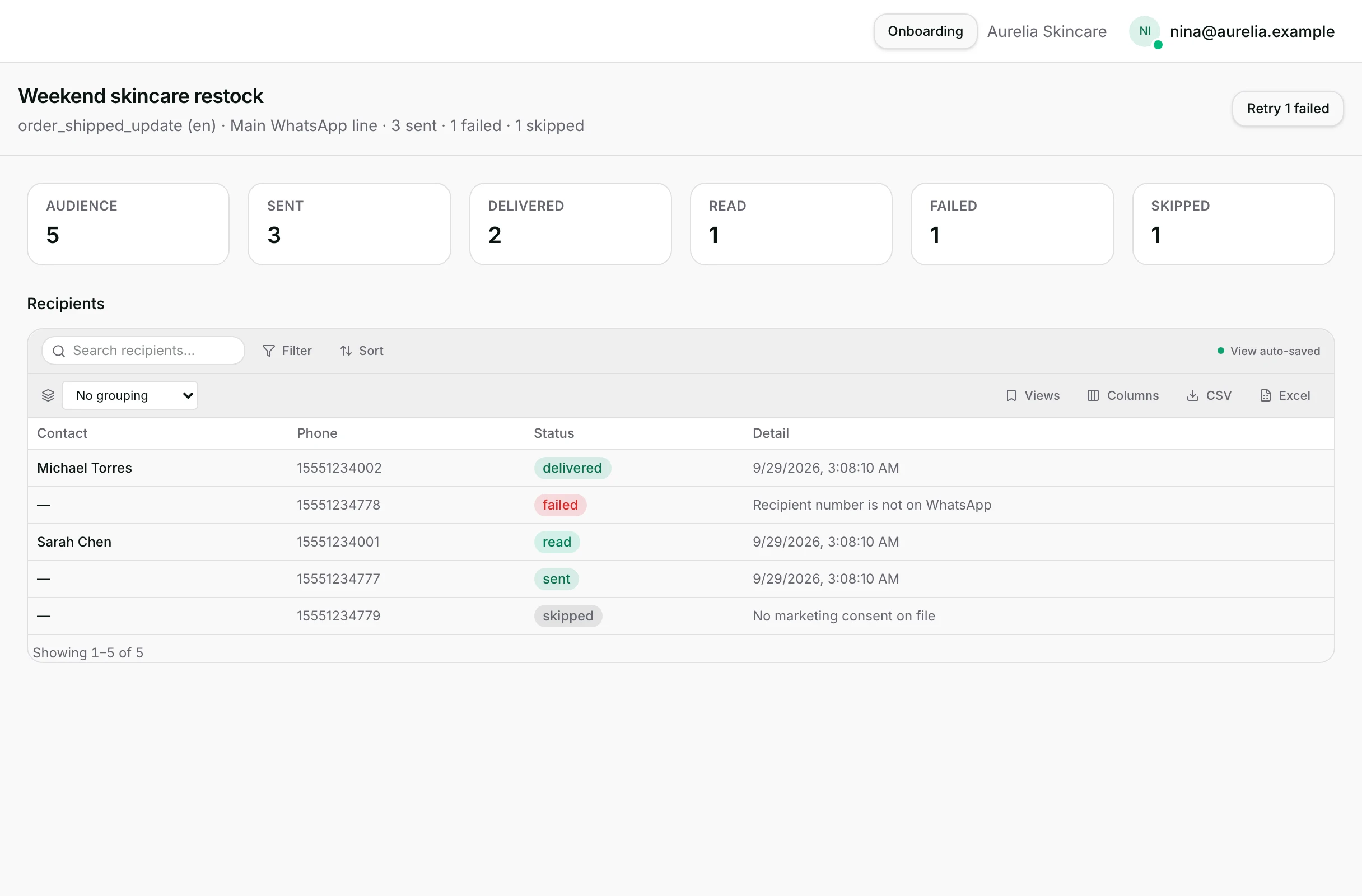
- Read the tiles: Audience, Sent, Delivered, Read, Failed, Skipped.
- Scroll to Recipients and search for one person by name or number.
- Read the Detail beside a failed row for its reason.
- If anything failed, wait for Completed or Failed, then use Retry failed for the failures that never reached WhatsApp.
Watch out
- Skipped is not a failure. It is usually consent, or a missing phone number.
- Retry failed cannot reach anybody whose message already went out.

Details
Getting here
Broadcasts → click a row to open its drawer → View Report. A draft or scheduled broadcast's drawer offers Continue Editing instead.
Before you start
- Only an owner or an admin can open Broadcasts at all.
- A broadcast that is still sending shows live counts, and the totals settle when it finishes.
- Retry failed needs your plan to allow broadcasts, the same as sending one.
Fields
- Scheduled
- The time it goes out, or Next tick when it has no set time.
- Limits: Shown while it is scheduled.
- Audience
- How many people it was published for.
- Sent
- Messages handed to WhatsApp.
- Delivered
- Receipts saying it arrived, including those since read.
- Limits: Shown once anything has been sent.
- Read
- Receipts saying it was opened.
- Failed
- Messages that did not go out, or came back failed.
- Skipped
- People in the list who were not sent to.
- No consent
- People the segment matched who had no active consent.
- Limits: Shown only when it stopped somebody.
- Clicked / Click rate
- People who clicked a tracked link, and that as a share of Sent.
- Limits: Shown only when the message carried a tracked link.
How it works
- Audience, Sent, Failed and Skipped are the broadcast's own running totals. Delivered and Read are counted across the whole list, not only the rows on screen.
- Delivered counts everybody whose message arrived, including those who then read it, so Read is a smaller number inside it.
- By channel appears when each contact was reached on the number they last used. It lists Channel, Template and Recipients, with a reminder above them: “Each contact was sent on the number they last messaged, with that number's template.”
- While a broadcast is still sending, those rows carry a note: “Still sending: these counts are live, the totals above update when sending finishes.”
- Recipients lists each person with Contact, Phone, Status and Detail, and it can be searched, sorted, filtered and grouped like any other list here.
- A status is pending, sending, sent, delivered, read, failed or skipped.
- Detail shows the time it went out for anything sent, and the reason for anything that failed. A failure with no reason on record says so rather than showing nothing.
- A skipped person's reason is on the row: no phone on file, marketing consent not active, or a marketing opt-out on record.
- No consent is not part of Audience and not a subset of Skipped. It counts people the segment matched before publishing, who never became recipients at all.
- Consent is checked again for every person as the broadcast sends, so somebody who withdrew after publishing is skipped rather than sent to.
- A failure that already carries a message id was accepted by WhatsApp and reported failed afterwards. It is shown and never re-sent, and the button says how many are in that group.
- Retry failed appears once the broadcast finishes as Completed or Failed and something failed. It re-queues the failures that never reached WhatsApp.
- Reschedule appears while it is scheduled, or on a row cancelled by an older version of the product.
- Cancel broadcast appears while it is scheduled, asks Confirm cancel, and returns the broadcast to a draft with its scheduled time cleared.
- When WhatsApp is slowing one of your numbers, a banner says since when and roughly when it resumes. The send is paused, not broken, and it carries on by itself.
When it fails
- Nothing matches the search or the filters on the list: No recipients match the current filters.
- A number the report cannot name: Unnamed channel. A recipient with no number on the row: No channel assigned.
- Retry failed before it finishes: Wait for the broadcast to finish before retrying failed recipients.
- Cancel on anything that is not scheduled: Only scheduled broadcasts can be canceled.
- A whole number being slowed down shows the banner rather than a pile of failures.
Limits
- Recipients lists the first five hundred rows. The heading says Recipients (first 500) when it is capped, and the tiles above still count everybody.
- Read is only reported where the channel reports it. A missing read is not proof nobody read it.
- Skipped is not a failure. It means the person was in the list and was deliberately not sent to.
- The report does not attribute revenue. Clicked counts people who clicked a tracked link and nothing further.
- Clicked counts people, not clicks, so one enthusiastic reader is one.
- Retry failed cannot reach somebody whose message already went out. It only re-queues failures that never got a message id.
- A sending broadcast cannot be cancelled. Only a scheduled one can.
Best practices
- Read Skipped before Failed. A large Skipped usually means consent, not a technical problem.
- Search the Recipients list for the customer who says they got nothing, and read their Detail.
- Wait for Completed before judging Delivered and Read. Receipts arrive after the send.
- Put a tracked link in the template when the point of the campaign is a click. Without one there is nothing to measure.
- Use Retry failed once, then read the reasons. A repeated failure is usually the number, not the send.
Use cases
- A campaign finished and you want the delivery rate: compare Delivered against Sent.
- Sarah Chen says she got nothing: search her in Recipients and read her Detail.
- A number is slow today: the banner tells you when it resumes, so nobody has to guess.
- Twelve messages failed before reaching WhatsApp: read their Detail, then use Retry failed once.
FAQ and troubleshooting
- Sent and Delivered are different. Is something broken?
- No. Sent is what went to WhatsApp; Delivered is what arrived. Receipts come back over the following minutes.
- Why is Read lower than Delivered?
- Read receipts are only reported where the channel reports them, and a customer may simply not have opened it yet.
- What is the difference between Skipped and Failed?
- Skipped means the send was deliberately not attempted, usually for consent or a missing number. Failed means it was attempted and did not work.
- Can I resend to somebody who never received it?
- Use Retry failed once the broadcast has finished. It re-queues the failures that never reached WhatsApp; anything already sent is left alone.
- Only five hundred recipients are listed. Where are the rest?
- The list shows the first five hundred rows. The tiles above count everybody, and the heading says when the list is capped.
- Can I still cancel?
- Only while it is Scheduled. Cancelling returns it to a draft and clears its time, so choose the timing again before you republish.
Reading this with an AI assistant? Plain Markdown version.