Review, test-send and publish a broadcast
Check who will receive it, send one test to yourself, then send now or pick a time.
Quick start
- As an owner or admin, click Next in the broadcast to reach the review.
- Read Recipients and each Excluded — … count.
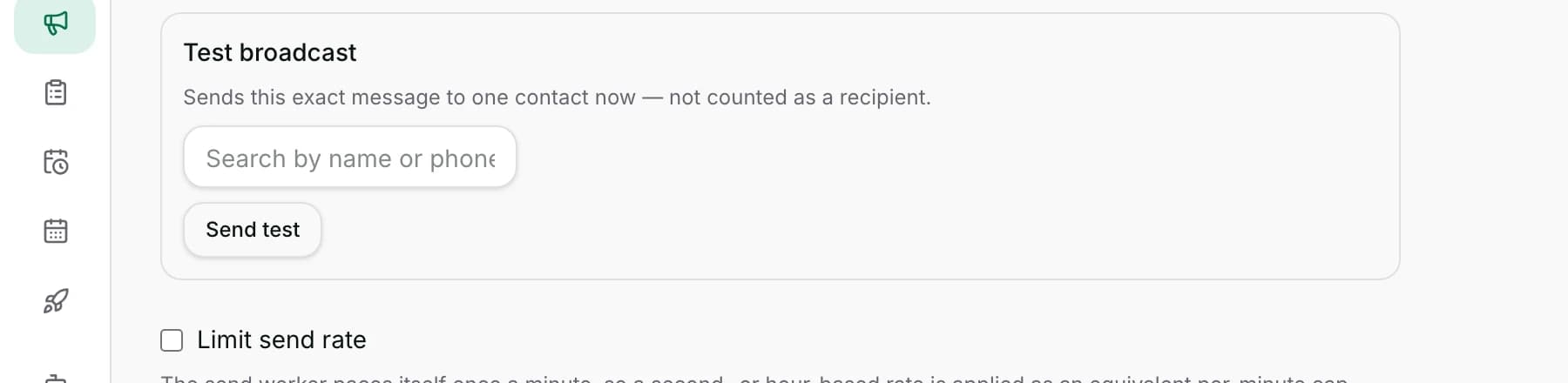
- In Test broadcast, type your own number, then click Send test. It sends a real message.
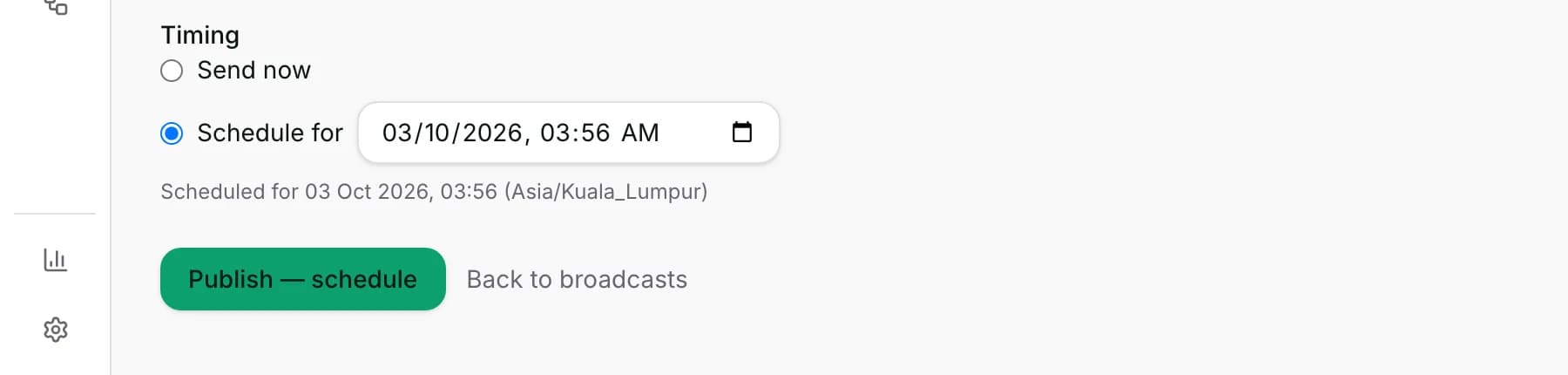
- Choose Send now, or Schedule for and pick a date and time.
- Click Publish — send now or Publish — schedule. It goes to everyone under Recipients whose consent still holds.
Watch out
- A test send is a real message, checked against neither consent nor blocking. Use your own number.
- Publishing cannot be undone. Only a broadcast that is still scheduled can be cancelled.
Details
Getting here
Broadcasts → open the broadcast → Next at the top right. The back arrow returns you to the setup.
Before you start
- Next stays greyed out until a channel and a message are both in place.
- Sending depends on your plan, and scheduling for later is a separate question from sending now; see pricing.
- Any paid plan may send now. Scheduling for later needs a higher plan.
- A test send is a real WhatsApp message, and it costs what a message costs.
Fields
- Recipients
- People who will be sent to.
- Messages
- How many messages that is.
- Excluded — no channel
- Matched the segment but has no usable number.
- Excluded — no consent
- Matched, but marketing consent is not active.
- Limits: Shown only when it stopped somebody.
- Excluded — never messaged this channel
- Removed by the previously-interacted rule on the setup.
- Limit send rate
- An optional cap of so many messages per second, minute or hour.
- Limits: Applied as a per-minute cap, so expect roughly rather than exactly the rate you typed.
- Timing
- Send now, or Schedule for with a date and time.
How it works
- The counts are worked out the same way publishing works them out, so the review is a preview rather than a separate calculation.
- Test broadcast sends this exact message to one person immediately. It is not counted as a recipient and never appears in the report.
- The search box finds a contact by name or number. Typing a number that matches nobody still sends to that number, which is how you test with your own phone. That number is then added as a contact, and the test appears as a conversation in your inbox.
- With several numbers selected you also choose which number's message to test with.
- Limit send rate paces the send. The worker checks itself about once a minute, so a per-second or per-hour rate is applied as the matching per-minute cap.
- Send now and Schedule for both publish. Publishing takes the audience as it is at that moment and writes the list of recipients; a send that is due goes out on the next tick, about a minute later.
- Publishing fixes who receives the broadcast. A scheduled broadcast still opens in the setup and saves your edits, but not every edit reaches the send, so cancel it back to a draft before you change it.
- Only one publish can win. A second attempt on the same broadcast is refused with This broadcast has already been published.
- A refusal about the setup appears here as a banner with Go to Configuration or Go to Message Content, which takes you to the exact row that is wrong.
- Save at the top writes any pending edit immediately, and says Saving… then Saved.
- The back arrow returns to Configuration and Message Content; Back to broadcasts leaves, saving first.
When it fails
- Schedule for chosen with no time picked: Pick a date and time, or choose “Send now”.
- A time already past: The scheduled time is in the past.
- A plan that may send but not schedule: the refusal names the plan needed and adds You can still send this one now.
- No channel: Choose a channel. No message: Choose a channel and a message first.
- A segment that matches nobody: This segment matches no contacts.
- Nobody in the segment has consented: No one in this segment has given marketing consent, with the number that matched.
- Everybody removed by the previously-interacted rule: the message says so, and on Specific channel it names the switch.
- A test send with nothing to send to: Search for a contact, or enter a phone number, to test-send to.
- A successful test says Test message sent.
Limits
- A test send is not checked against marketing consent and not checked against blocking. It goes to whoever you name, so name yourself.
- A test send does not appear in the report, and does not use up the schedule.
- Publishing cannot be undone from here. A scheduled broadcast can be cancelled back to a draft; one that has begun sending cannot.
- The audience is resolved when you publish, not when the scheduled time arrives. Somebody who withdraws consent in between is still skipped, because consent is checked again for every person as it sends.
- The time you pick is read from your own device's clock, while the line below it repeats that moment in the fixed zone
Asia/Kuala_Lumpur. On a device set to another zone the two read differently. - The rate limit is approximate, because the pacing is re-checked about once a minute.
Best practices
- Always send one test to your own number, and read it on a phone. The preview cannot show you a broken picture or a button that goes nowhere.
- Read Excluded — no consent before you publish. It is the number that tells you whether your list was ever asked.
- Schedule rather than sending now when the audience is large, so you can still cancel.
- Use Limit send rate on a first big campaign to spread it out. A send that has started cannot be stopped, so read your test message first.
Use cases
- A festival campaign: test to yourself, then schedule it for the morning.
- A flash offer: test, then Publish — send now.
- A first large send: cap the rate, publish, and watch In Progress.
- A refusal you do not understand: click Go to Message Content, and the offending row is pointed at.
FAQ and troubleshooting
- Does a test send count as a recipient?
- No. It is sent immediately to whoever you name, and it is not in the report at all.
- Can I test-send to somebody who has not consented?
- The test does not check consent, so it will go. Use your own number: sending marketing to somebody who has not opted in is exactly what the consent rule exists to prevent.
- I pressed Send now. Why has nothing arrived?
- Publishing hands the broadcast to the sender, which picks it up on its next tick, about a minute later. Watch Sent on the report.
- Can I edit the message after publishing?
- Cancel it back to a draft first, which only works while it is still scheduled. The setup still saves edits to a scheduled broadcast, but not every edit reaches the send. Cancelling clears the time, so choose the timing again before you republish.
- The scheduled time I see is not the time I typed.
- You pick on your device's clock, and the confirmation repeats it in the fixed time zone the product schedules in. If your device is set to another zone, expect the difference.
Reading this with an AI assistant? Plain Markdown version.