Choose who receives a broadcast
Pick the number or numbers you send from, and the segment of contacts you send to.
Quick start
- As an owner or admin, click Broadcasts, then Add Broadcast or open a draft, and find Configuration.
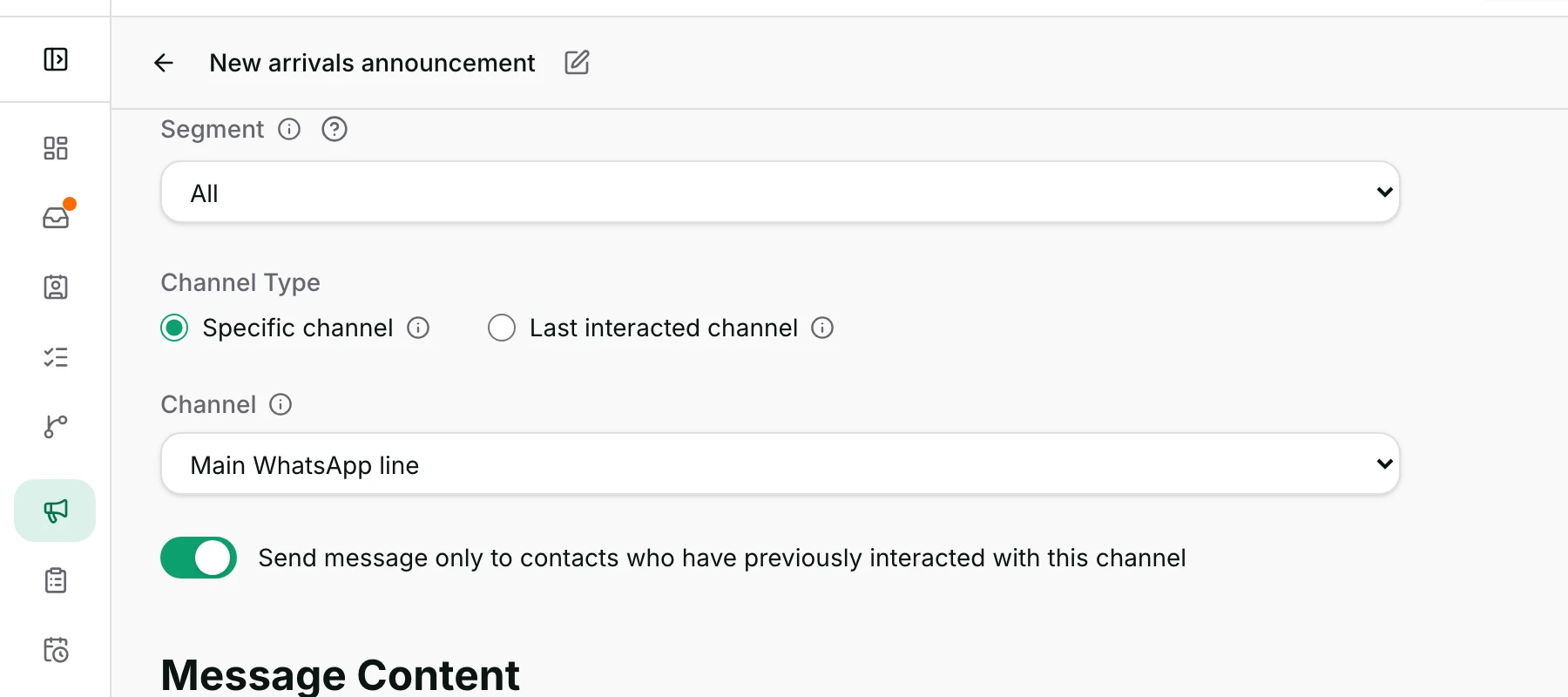
- Choose a Segment, or leave it on All — everybody, before the consent check.
- Under Channel Type, pick Specific channel for one number, or Last interacted channel.
- Choose the Channel, or tick the numbers under Selected Channels. Nothing is sent here.
- Scroll on to Message Content.
Watch out
- Marketing consent is applied whatever the segment says. No setting here overrides it.
- Blocking a contact does not take them out of an audience.
Details
Getting here
Broadcasts → Add Broadcast, or open an existing draft and click Continue Editing or Open Builder. Configuration is the first section of the setup.
Before you start
- Only an owner or an admin can build a broadcast.
- You need at least one WhatsApp number with a working connection. With none, the picker says No data available and explains: No WhatsApp channel with a valid credential — connect one in Settings.
- Build the segment first if you have one in mind. You can also create one here.
Fields
- Segment
- Who this goes to. All is everybody, and + Add Segment creates a new one without leaving the page.
- Specific channel
- Send this broadcast to a single, selected target channel.
- Last interacted channel
- Send this broadcast through the channel each contact last interacted with.
- Channel
- Which of your numbers, for Specific channel.
- Selected Channels
- Which of your numbers may be used, for Last interacted channel.
- Send message only to contacts who have previously interacted with this channel
- Keeps the send to people who have actually written to that number before.
- Default: on
- Limits: Offered on Specific channel only. On Last interacted channel the rule always applies and there is no switch.
How it works
- Segment offers + Add Segment, All, and every segment your workspace has saved. Picking one narrows the audience to it.
- The pencil beside a chosen segment opens its rules right here, so you can change and save them without going to Contacts.
- + Add Segment creates an empty segment, names it, and opens its rules for you to fill in.
- Specific channel sends everybody the same template from one number.
- Last interacted channel sends each contact from the number they last wrote to, using that number's own template, so every selected number needs its own message.
- The "previously interacted" switch keeps the send to people who have written to that number. Writing in means an inbound message on it — a conversation you opened and they never answered does not count.
- With Last interacted channel that rule is always on and there is no switch, because the whole point is the number they last used.
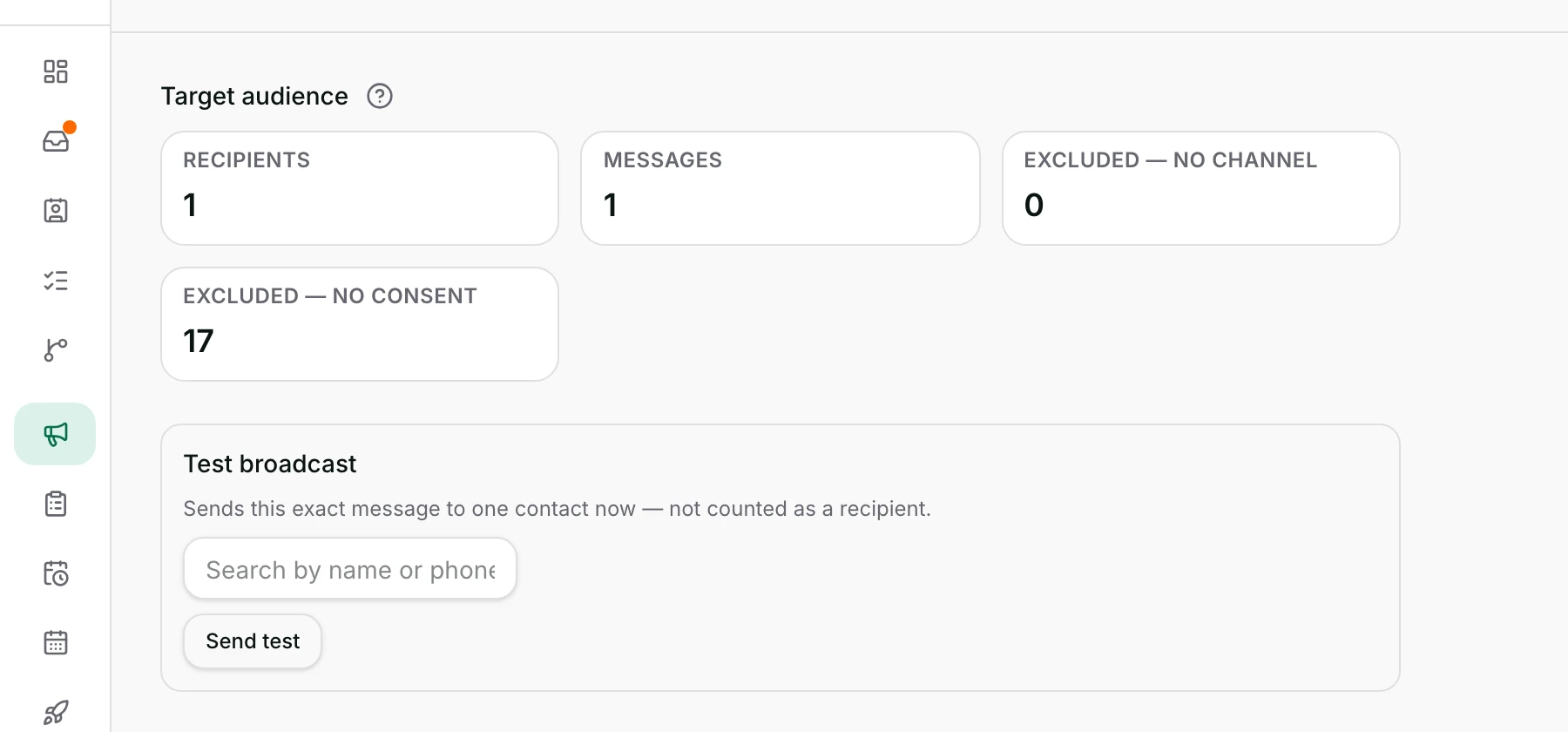
- The audience is worked out live while you build, and the Review section shows the counts.
- Marketing consent is applied on top of the segment, whatever the segment says, and the people it removes are counted as Excluded — no consent.
- People with no usable phone number stay in the count as Excluded — no channel, so the audience never shrinks without saying why.
- People removed by the previously-interacted rule are counted as Excluded — never messaged this channel, or Excluded — never messaged any selected channel when several numbers are selected.
- The audience is capped at 10,000 people in one broadcast. The cap is applied after the consent check, so a very large segment with few opted-in people still resolves to all of them.
- Past that cap the extra people are left out with no warning on screen, so split a larger segment into several broadcasts yourself.
- Everything you change here saves by itself while you work. Save at the top writes it immediately.
When it fails
- No channel chosen when you move on: the field is outlined and says This field is required.
- No channel at all on your workspace: No data available in the picker.
- The segment's rules no longer make sense: That segment's definition is invalid — re-save it first.
- A deleted segment does not stop a draft. It keeps the rules it copied when you picked the segment, and Segment shows All.
- Last interacted channel with nothing ticked: Select at least one channel.
- A segment that matches nobody stops the publish with This segment matches no contacts.
- A segment where nobody has consented: No one in this segment has given marketing consent, with the number that matched.
- Everybody removed by the previously-interacted rule: the refusal says so, and on Specific channel it tells you the switch is what to turn off.
Limits
- This section does not write the message. That is Message Content.
- It cannot reach somebody who has never messaged you on a selected number while the previously-interacted rule applies.
- It cannot override marketing consent. No broadcast setting sends to somebody who has not opted in. The one exception is a test send, which goes to the single person you name without a consent check.
- It does not check whether a contact is blocked. Blocking hides somebody from your inbox; it does not take them out of an audience.
- A segment is a set of rules, and publishing reads them as they are at that moment, not as they were when you picked the segment. The audience can differ from what you saw an hour ago.
- Only WhatsApp numbers appear here. A broadcast is a WhatsApp template send.
Best practices
- Open the segment's rules with the pencil and read them before you publish. The name alone is not evidence.
- Leave the previously-interacted switch on unless you know why you are turning it off. It is what keeps a send to people who know you.
- Use Last interacted channel when you run several numbers, so nobody is messaged from a number they have never seen.
- Watch Excluded — no consent on the Review section. A large number means consent was never collected.
Use cases
- A promotion to everybody who bought last month: pick that segment, one number, and leave the switch on.
- You run two numbers for two brands: choose Last interacted channel, tick both, and write one message per brand.
- A quick reminder to everyone: leave Segment on All — consent still decides who actually receives it.
- You realise the segment is slightly wrong: click the pencil, fix the rule, and save without leaving the page.
FAQ and troubleshooting
- What does All actually mean?
- Every contact in your workspace, before the consent check. The consent check still runs, so All is never everybody.
- Can I send to people who have never messaged me?
- Only if they have a number on file, have given marketing consent, and the previously-interacted switch is off. On Last interacted channel it cannot be done at all.
- Why is my audience smaller than my segment?
- Consent, a missing number, or the previously-interacted rule. Each one is counted separately on Review, so you can see which.
- Can I pick more than one segment?
- No, one at a time. Build a segment that covers both groups instead.
- If I change the segment after publishing, does the send change?
- No. A published broadcast holds its own list of recipients from the moment it was published. Consent is still checked again for each person as it sends.
Reading this with an AI assistant? Plain Markdown version.