Reply to a customer
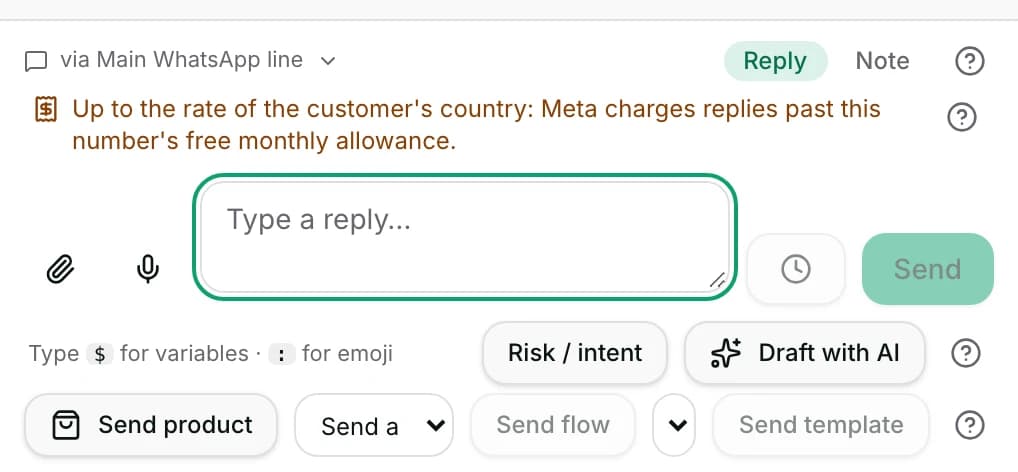
The box at the bottom sends a reply, an internal note, a file or a voice note, and says what it costs.
Quick start
- Open Inbox and click a conversation. In the app, tap the Inbox tab, then the chat.
- Type in Type a reply… at the bottom. Owners, admins and agents can send; viewers cannot.
- On WhatsApp, read the cost line just above the box: it says whether this reply is free.
- Press Send. It goes to the customer straight away, on this conversation's channel.
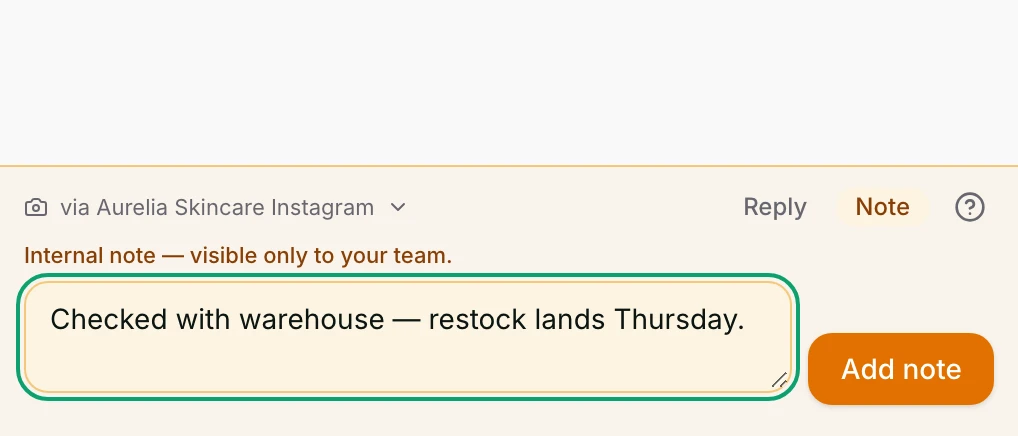
- For a team-only remark, switch to Note first. Only your team sees a note.
Watch out
- Nothing un-sends a delivered message. Delete for me hides it from your view only; everyone else still sees it.
- On WhatsApp, free text stops once the box says The 24-hour reply window has closed. Then only an approved template goes.
Details
Getting here
Inbox → open a conversation → the box at the bottom of the conversation. In the app: the Inbox tab → tap a conversation → the reply bar at the bottom.
Before you start
- An owner, admin or agent can send. A viewer cannot: the send is refused with You don’t have permission to change conversations here.
- The conversation needs a channel and a contact. Without either, the send is refused.
- On WhatsApp, free text is only allowed inside the reply window. Outside it, send an approved template instead.
Fields
- Reply / Note
- Reply goes to the customer. Note is saved to the conversation for your team only.
- Default: Reply
- via {context}
- Which number or page you are answering from. Click it to pick another of the contact's channels.
- Limits: Shown only when the contact can be reached on more than one.
- Snippets
- Insert a saved piece of text. Type
/in the box to open it. - Variables
- Insert a value about the contact, such as
{{contact.first_name}}. Type$to open it. - Emoji
- Insert an emoji. Type
:to open it. - Mention
- In a note, type
@to name a teammate. They get a notification. - Limits: Notes only. A mention in a reply notifies nobody.
- Attach a photo, video or document
- Pick a file to send with your text.
- Record a voice note
- Hold to record, then Send voice note.
- Schedule send
- Send this message later instead of now.
- Limits: At least one minute from now, and at most 90 days out.
How it works
- Send writes the message to the conversation and hands it to the channel straight away. The bubble shows Sending… until the channel confirms it.
- A note is stored on the same conversation and marked Internal note · {sender}. It is never sent anywhere, on any channel.
- When the contact can be reached on more than one number or page, via {context} opens a list of them. Current is the one you are on; Start on this number opens a fresh conversation on another.
- Just above the box, a line says what the next message costs on WhatsApp. It is a plain statement of Meta's price, not a charge by us.
- Free reply appears while Meta is still not charging for replies. The line goes on to name the date charging starts, the rate, and how many replies a month this number gets free.
- Free reply: {used} of this number’s {limit} free replies used this month. counts this number's free monthly replies.
- Meta charges {rate} for this reply appears once this number's free replies for the month are gone. The line names the rate and the monthly allowance.
- Free: this customer is in Meta’s free entry window until {time}. appears when the customer arrived from a Click-to-WhatsApp ad or a Page WhatsApp button. Everything is free until then, templates included.
- When the customer's country is not the one our rate table covers, the line says the rate is that country's instead of naming a figure.
- A template's own cost line names its category: marketing, utility or authentication.
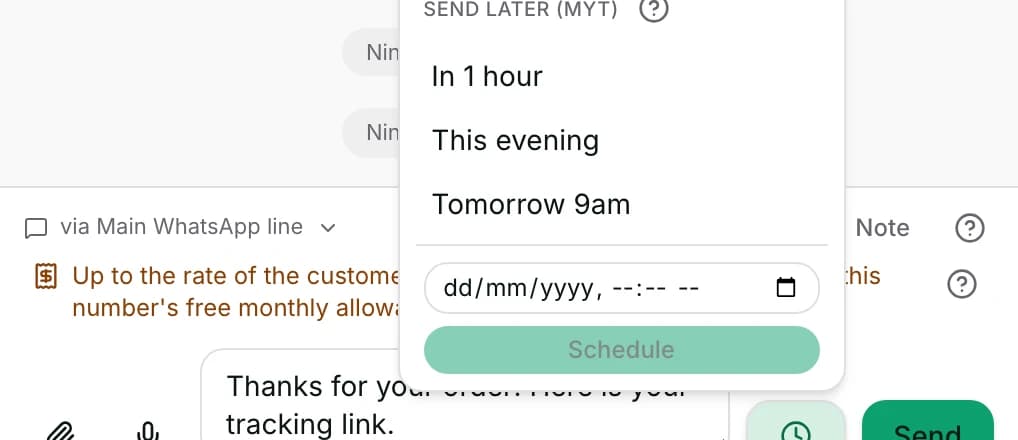
- The clock button next to Send opens Send later (MYT) with In 1 hour, This evening and Tomorrow 9am, or a time you type. Schedule queues it.
- A scheduled message waits in the Scheduled messages list under the conversation and is sent by a job that runs about once a minute.
- Cancel scheduled message removes one that has not been sent yet.
- On the phone the reply bar also sends a location and a contact card, and has an HD switch for photos. The web box has neither.
When it fails
- On WhatsApp, once the reply window has closed, the box is replaced by The 24-hour reply window has closed and the template row. Free text cannot be sent until the customer writes again.
- For a customer who has never written to you, the same place says This person has not messaged you yet. The first message has to be an approved template.
- When the number is also used in the WhatsApp Business app, the notice adds that replying from the phone is not limited by the window and costs nothing.
- Failed to send on a bubble means the channel refused it. Read the reason in the message that appears, fix it, and send again.
- Delivery failed means the channel accepted it and then could not deliver it.
- Delivery unknown means we cannot tell. Check the conversation before sending the same message again — it may already have arrived.
- This message is still sending. Check the thread before sending again. stops a second copy going out while the first is in flight.
- Message was sent followed by a note that it could not be saved here means the customer has it and the conversation does not show it yet. Refresh to confirm.
- When the channel's credentials are broken, a notice replaces the box and links to Channel settings.
- Pick a time at least one minute from now. and That is not a valid date and time. refuse a bad scheduled time.
- Scheduling past the end of the window is refused before it is queued, with a sentence naming that channel's window and asking for an earlier time or a template.
- A scheduled message that failed is marked Not sent · scheduled {at}, or Delivery unknown · scheduled {at}. Not scheduled is what you see when the time you picked is refused.
- A file over the size limit is refused. The message names the file's size and the limit, and suggests a link or a smaller copy.
- A voice note that is too short is refused: Hold a little longer — that note was too short.
Limits
- A sent message cannot be un-sent, deleted for the customer, or edited. Delete for me only hides it from your own view.
- Scheduling does not hold a closed WhatsApp window open. A time past the window is refused when you schedule it, not when it is due.
- The box does not check marketing consent. Broadcasts check it, and so does a workflow's marketing template step — not a reply or a template you send by hand.
- Blocking a contact hides their conversations from every view but Blocked. It does not stop a reply typed from inside the conversation.
- A note is not a message to the customer, but it is not private either: everyone who can open this conversation can read it.
- The cost line describes what Meta charges. It is not an invoice, and it does not include what anyone else charges.
- The web box cannot send a location, a contact card or an HD photo. Those are on the phone only.
Best practices
- Read the cost line before sending a template. It is the one place the price of the next message is stated.
- Use Note for handover context — what you promised, what you are waiting for — so the next person does not ask the customer twice.
- Keep a snippet for the three answers you type every day, and insert it rather than retyping.
- When the window has closed, send the template that invites a reply. The customer's answer opens the window again for free text.
- Schedule rather than saving a draft you mean to send this evening. A scheduled message survives you closing the tab.
Use cases
- Sarah Chen asks for a price at midnight; you schedule the answer for Tomorrow 9am.
- Michael Torres sends a payment slip; you reply, then add a note naming the order for whoever ships it.
- A customer writes on Messenger and on WhatsApp; you use via {context} to answer on the number they use most.
- Three days after the last message the window is closed; you send an approved template, and their answer reopens it.
- A customer asks what the product looks like; you attach two photos with one line of text.
FAQ and troubleshooting
- Why can I not type a reply?
- On WhatsApp, free text is only allowed for a while after the customer's last message or call. Once that has passed the box is replaced by the notice and the template row. Send an approved template instead.
- Does the customer see my note?
- No. A note is stored on the conversation and marked as internal. It is never sent on any channel. Everyone who can open the conversation can read it.
- What does the cost line above the box mean?
- It says what Meta will charge for the next message on this WhatsApp number — free, free while this number still has free replies this month, or a named rate.
- Can I take back a message I sent by mistake?
- No. Nothing un-sends a delivered message. Delete for me removes it from your own view and changes nothing for the customer or your teammates.
- Will a scheduled message still send if I close the browser?
- Yes. It is queued on the server and sent by a job that runs about once a minute. Closing the tab, or signing out, changes nothing.
- The bubble says Delivery unknown. Should I send it again?
- Read the conversation first. The message may already have reached the customer, and sending again would deliver it twice.
- Can I send a voice note or a photo from the web?
- Yes — Record a voice note and Attach a photo, video or document are both in the box. Sending a location or a contact card is on the phone only.
Reading this with an AI assistant? Plain Markdown version.