Reply to, star, forward, delete or find one message
Reply to, star, forward or hide one message in a conversation, and search inside a long conversation for the words you need.
Quick start
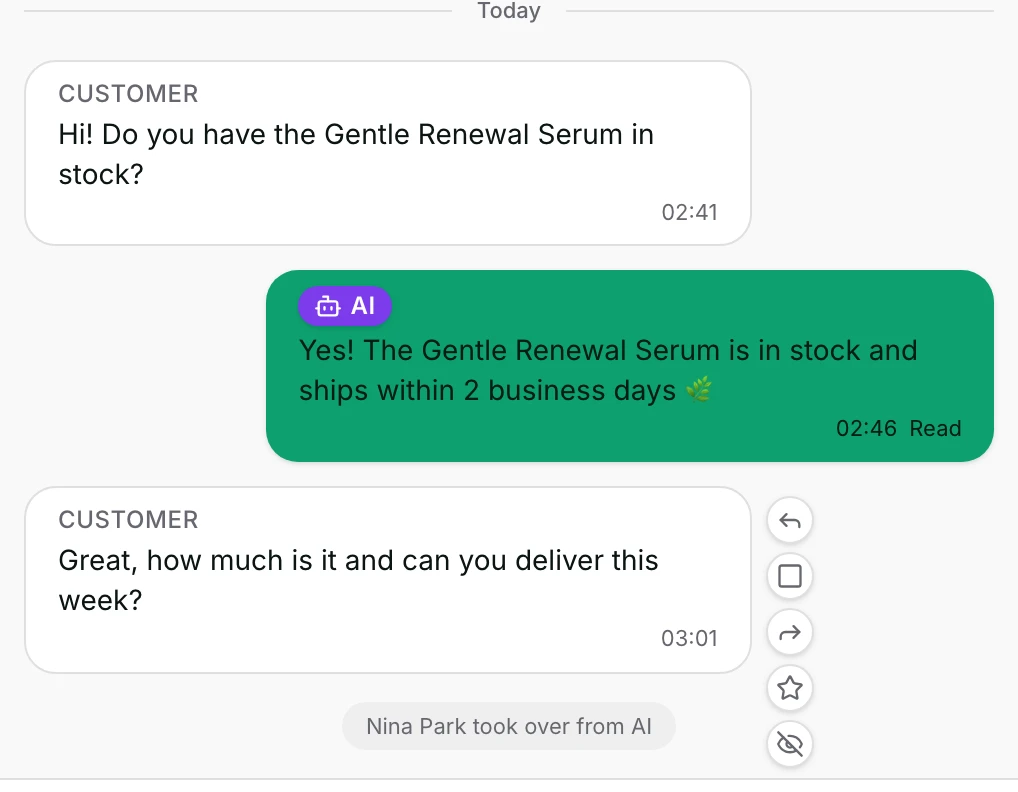
- Open Inbox and a conversation. On the web, hover a message; in the app, long press it.
- Click Reply to answer that message. It is quoted above the reply box until you send.
- Click Star to keep it privately, or Forward to send it to another customer's chat.
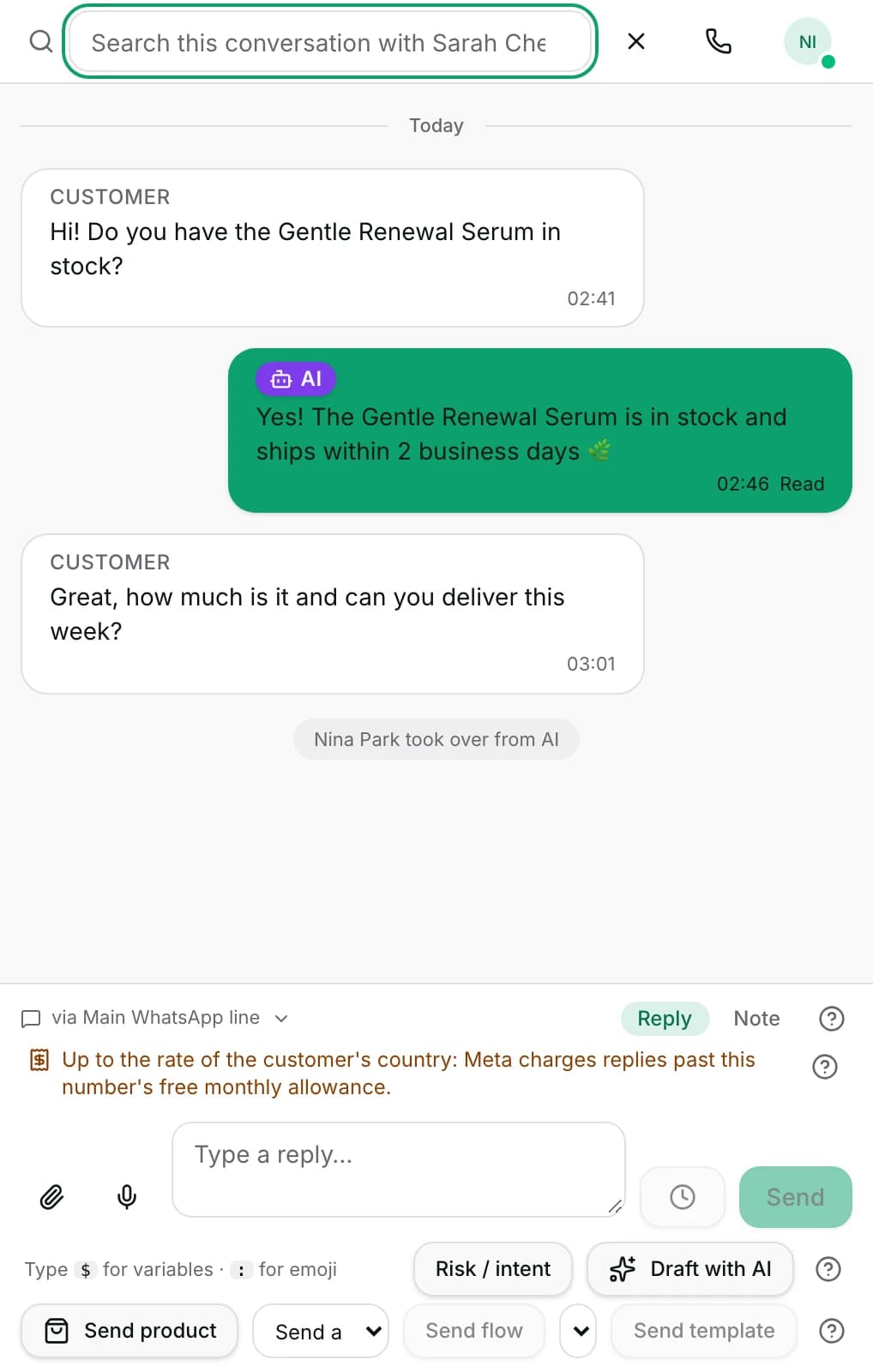
- Click the magnifier (Search this conversation) in the header to find a message by its words.
- Open Starred messages above the list to see everything you starred.
Watch out
- Delete for me hides a message from your own view. The customer and your teammates still have it.
- A star is private and is not a task. Nobody is told, and nothing reminds you later.
Details
Getting here
Inbox → open a conversation → hover a message for Reply, Select, Forward, Star and Delete for me. The magnifier (Search this conversation) is in the header; Starred messages sits above the conversation list. In the app: long press a message bubble for the same actions, and open Starred messages from the inbox header.
Before you start
- Starring, hiding and searching need no special role. A viewer can do all three.
- Forwarding sends a message, so it needs an owner, admin or agent, and the same channel rules as any other send.
- There is nothing to set up. Every action works on messages already in the conversation.
How it works
- Reply puts the message above the reply box under Replying to. Your next reply, file, product or template answers it; the × (Cancel reply) clears it.
- Where the channel shows quotes, as WhatsApp does, the customer sees a quoted reply. Where it cannot, the strip says Replying to (visible to your team) and only your team sees the quote.
- Star keeps a message on your own list. It is private: Only visible to you — starring never changes what anyone else sees.
- The Starred messages page lists them with the contact, the message, the channel and when you starred it, and you can search that list.
- Unstar takes one off again, from the message or from the starred list.
- Select turns on multi-select. Tick up to 20 messages, then Forward {count} messages.
- The forward picker offers Frequently forwarded and Recent chats, and searches by name or phone. This chat is offered too.
- A forward sends the text and each attachment again in the target chat — one message per attachment, the text riding on the first — and says Forwarded to {name}.
- Attachments are fetched and copied before the first send, so a file that can no longer be fetched refuses the whole forward. If a later send fails, the error says how many attachments went.
- Delete for me hides the message from your view only. The message that follows says Only you stopped seeing it — nobody else’s view changed. and offers Undo.
- Search this conversation filters the messages on screen to those that match, and the header shows {count} found.
- Load earlier messages at the top fetches the previous page. It walks past the conversation itself, so a chat that was closed and started again still reads as one history.
- In the app the search also steps between matches with Previous match and Next match, and shows {at} of {total}.
When it fails
- Could not star this message — the star was not saved; the message is unchanged.
- Could not delete this message — the message stays on screen for you.
- Internal notes can’t be forwarded. — a note is for your team, so it cannot be sent to a customer.
- Template messages can’t be forwarded — send the template from the composer instead. — an approved template has to be sent as a template.
- That kind of message can’t be forwarded. — the message holds only something the composer cannot send, such as a location or a contact card.
- There is nothing in that message to forward. — no text and nothing sendable in it.
- Could not load earlier messages. Please try again. — the older page did not load; what is on screen is unchanged.
- No messages match your search. — nothing in the loaded part of the conversation contains those words.
- In the app, That message is older — use Load earlier messages above. means the match you tapped is not loaded yet.
Limits
- Reply is not offered on an internal note, on a message still sending, on a send the platform refused, or to a viewer.
- An internal note never carries the quote, and a quote picked earlier is dropped when the WhatsApp window closes.
- Delete for me does exactly that. The customer still has the message, and your teammates still see it.
- Nothing here deletes a message for the customer or takes back a delivered message.
- A star is private and is not a task. Nobody is notified, and nothing reminds you about it later.
- Searching inside a conversation reads the messages already loaded. Words in an older, unloaded part are found only after Load earlier messages.
- The search matches message text. It does not read a file's contents, and it does not read a voice note nobody has transcribed.
- A forward is a new message on the target channel, with that channel's own rules — including a closed WhatsApp window.
- At most 20 messages can be forwarded at once, and one forward carries only the first few attachments of a message.
- Web has no step-through of search matches. It highlights and counts them; moving between them one by one is in the app.
Best practices
- Star the message that carries the address, the reference number or the promise. It is faster than scrolling for it tomorrow.
- Forward the customer's own words to a colleague rather than retyping them. The original wording usually carries the detail.
- Use Delete for me for something you opened by mistake, not as a way to correct the record — the record does not change.
- Search inside the conversation before asking the customer to repeat themselves.
- Check the Undo offer straight away. It is the one moment where hiding a message can be taken back with a click.
Use cases
- Michael Torres sends a delivery address in the middle of a long chat: star it before you scroll on.
- A customer reports a fault another teammate is handling: forward their two messages into that chat.
- You need to know what was agreed about a refund: search the conversation for the word.
- An accidental duplicate clutters your view: Delete for me, and leave the customer's view alone.
- A colleague asks what a customer said last month: Load earlier messages until it appears, then forward it.
FAQ and troubleshooting
- Does Delete for me delete the message for the customer?
- No. It hides it from your own view. The customer keeps it, and so do your teammates.
- Can my teammates see what I starred?
- No. The starred list is yours alone, and starring changes nothing anyone else sees.
- Can I forward a template or an internal note?
- No. A note is internal, and an approved template has to be sent as a template from the composer. Both refusals say so.
- I searched and the message is not found, but I know it exists.
- Search reads the part of the conversation that is loaded. Click Load earlier messages until the older part is on screen, then search again.
- How many messages can I forward at once?
- Up to 20. One forward carries only the first few attachments of a message, and the error tells you how many went if a send fails part way.
- The conversation was closed and started again. Do I lose the old messages?
- No. Load earlier messages reaches past the earlier conversation, so the history reads as one.
Reading this with an AI assistant? Plain Markdown version.