Tags and lifecycle stages
A tag labels a person or a single conversation. A lifecycle stage says where that person is in your funnel.
Quick start
- Open a conversation in Inbox, on the web or on the app, and find Tags in the contact panel.
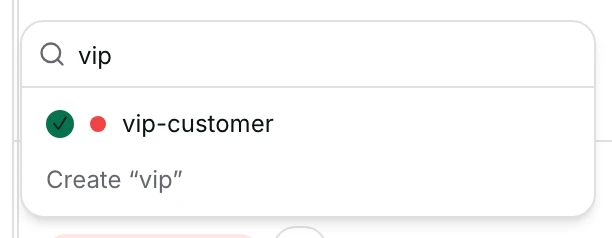
- Click +, then tick a tag or type a new name to create one.
- Beside a conversation, do the same under Conversation tags for that conversation only.
- Under Lifecycle, pick the stage this person is on now, or No stage.
- Filter by a contact tag or a stage from Contacts. A new tag or stage can start a workflow.
Watch out
- Deleting a stage never deletes contacts. They stay, with no stage.
- A tag typed into the picker is added to the workspace tag list too, with an automatic colour.
Details
Getting here
The contact panel beside a conversation, the full profile page, or the Tags and Lifecycle cells in the contacts list. Stages themselves are managed under Settings → Lifecycle stages. On the app: open the contact and use Tags, Conversation tags and Lifecycle.
Before you start
- Owners, admins and agents can apply tags and change a stage. A viewer sees them and cannot change them.
- Managing the stage list — adding, renaming, reordering, deleting — is an owner, admin or agent action on the web.
- A workspace with no stages yet says No lifecycle stages defined for this workspace yet. on the app, and offers nothing to pick.
Fields
- Tags
- Labels on the person. They follow them into every conversation.
- Conversation tags
- Labels on one conversation only. The same person can carry different ones on different conversations.
- Lifecycle
- One stage at a time, or No stage.
- Stage name
- Up to 64 characters.
- Stage emoji
- Optional, shown in front of the name everywhere the stage appears.
- Lost stage
- Marks a stage as an ending rather than a step.
- Limits: Those stages are listed separately under Lost stages in the contacts rail.
How it works
- The tag picker shows your workspace's tag list in the order an admin arranged, with the ones already on this person ticked where they sit.
- Typing a name that is not in the list offers to create it. Choosing that puts the name on the contact straight away.
- A name created that way is also added to the workspace tag list, with a colour picked from its name and no description. An admin can change both under Settings → Tags.
- Every add and every remove saves the whole list at once. The chips move first, and go back if the save fails.
- Adding a tag can start a workflow. Only what actually changed counts, so re-saving an unchanged list starts nothing, and a removal is reported as a removal.
- Conversation tags belong to the conversation, so they appear in the inbox rail and in inbox filters rather than in a contact filter.
- A lifecycle stage is one value on the person. Setting a new one replaces the old one, and No stage clears it.
- Inside an open conversation the stage picker and the header chip share one value, so changing it in one place moves the other immediately.
- In the contacts list you can change the stage from the row itself, without opening anybody.
- The left rail counts contacts per stage, and clicking a stage filters the list to it.
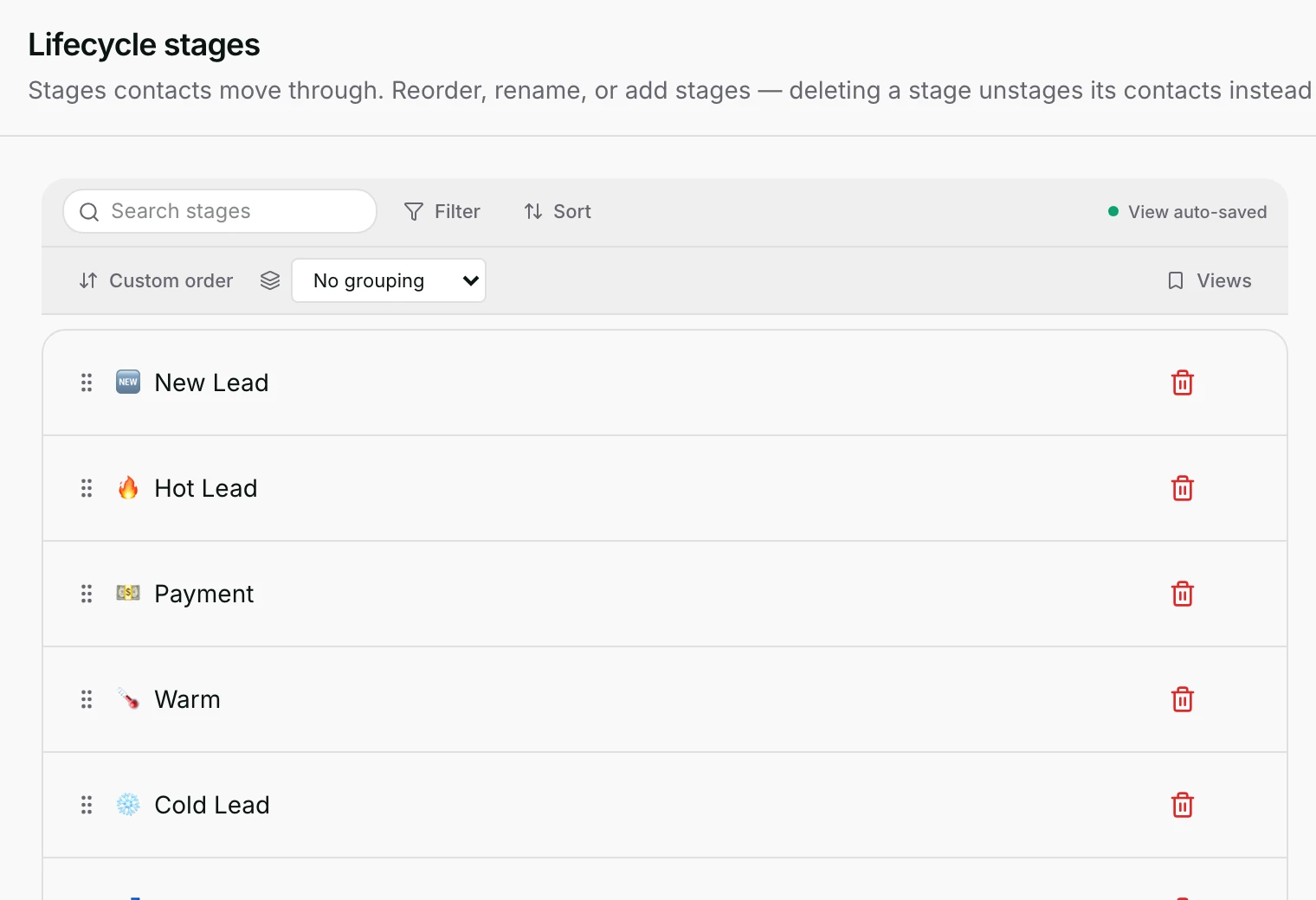
- Settings → Lifecycle stages lists the stages in their own order. Drag to reorder, click a name to rename it, tick Lost stage to mark it as an ending, and use the bin to delete one.
- Deleting a stage does not delete anybody. The contacts on it become unstaged, which is what the confirmation says before you agree.
When it fails
- A stage saved with an empty name: Stage name can't be empty.
- A name another stage already uses: A stage with this name already exists.
- A stage change the server refuses: Could not update lifecycle stage.
- A tag change the server refuses: Could not update tags., and the chips go back to what they were.
- A conversation tag that will not save says it could not be added, or could not be removed, naming the tag.
- Creating, renaming or deleting a stage can fail with Could not create stage., Could not update stage. or Could not delete stage.
Limits
- A stage change sends the customer nothing on its own. A workflow listening for a lifecycle change is what turns a stage into a message.
- A person is on one stage at a time. Use tags when somebody needs to be several things at once.
- A tag typed into the picker joins the workspace tag list with an automatic colour and no description until an admin sets them.
- Conversation tags do not roll up onto the person, and contact tags do not appear as conversation tags.
- Deleting a tag is not done from a contact. It is a Settings → Tags action, and it asks you to confirm how many contacts carry it.
- The app can apply both kinds of tag and set a stage, but cannot add, rename, reorder or delete a stage.
Best practices
- Keep tags few, and spell them the same way every time. Two spellings are two filters, and a broadcast will find only one of them.
- Use stages for the path everybody walks, and tags for everything else. A stage nobody ever leaves is really a tag.
- Give a tag typed in the picker a colour and a description in Settings → Tags, so teammates know what it means.
- Before deleting a stage, filter the list by it and move those people somewhere else, so nobody is quietly unstaged.
- Put a tag on everything one import or one campaign brought in. It is the cheapest way to undo a mistake later.
Use cases
- Sarah Chen asks about wholesale: tag the conversation, so the next person to open it knows what it is about.
- A customer buys: move them to your Customer stage, and let a workflow listening for that stage send the thank-you.
- You want to stop messaging a group: tag them, then build a segment that leaves anybody with that tag out.
- A stage has grown into three steps: add two more stages and drag them into order.
FAQ and troubleshooting
- What is the difference between a tag and a stage?
- A tag is a label and you can have many. A stage is where the person is in your funnel, and there is only one.
- I added a tag on the contact and it did not appear on the conversation.
- Those are two lists. Tags follow the person; Conversation tags belong to one conversation.
- If I delete a stage, do I lose the contacts on it?
- No. They stay and become unstaged. The confirmation says so before you agree.
- Does changing a stage message the customer?
- Not by itself. It can start a workflow if one listens for that stage, and the workflow does the messaging.
- Why does my new tag have a colour I did not choose?
- A tag created from the contact picker gets a colour picked from its name. Change it under Settings → Tags.
Reading this with an AI assistant? Plain Markdown version.