AI workflow builder
Describe the follow-up. Watch it appear on the canvas.
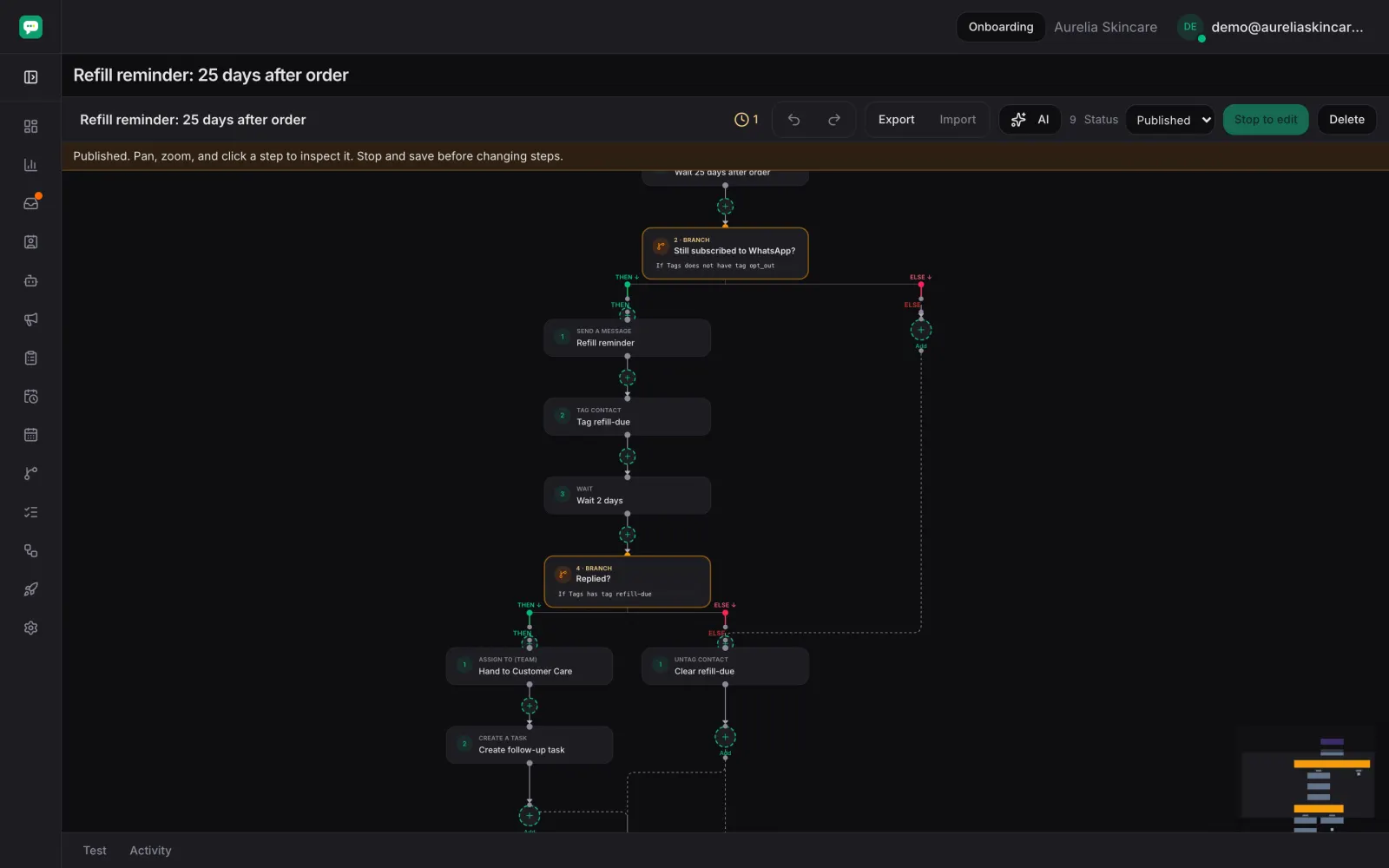
Type what should happen — "25 days after an order, remind them to refill; if they don't reply in two days, tell Marcus" — and the builder lays out the trigger, the waits and the branches. It shows you the diff before it changes anything you already published.
- Triggers on orders, payments, tags, dates, ads, forms, bookings and inbound webhooks
- Date triggers for birthdays, refills and N days either side of any date
- Reopens a conversation when a customer has gone quiet
- A diff to review before a published flow changes
What you get
Describe it once, in a sentence
Type the follow-up you want and the builder lays out the trigger, the waits, the conditions and the branches on a canvas you can read and edit.
Triggers for the things that actually happen
Orders, payments, payment slips, tags, contact fields, dates, ad clicks, forms, bookings, finished calls, clicked links, a conversation going quiet, and inbound webhooks from your own systems.
Date triggers do the quiet work
Any date on a contact can fire a message a set number of days before or after it — refills, birthdays, renewals, service intervals. It runs whether or not anyone remembers.
A diff before anything published changes
Edit a live flow and you see exactly what the change does before it takes effect, instead of discovering it in a customer's thread.
Steps that reach the rest of the product
Send a message or an approved template, wait, branch, ask a question, tag, assign, set the lifecycle stage, move a deal, create a task, report an event back to Meta, or call your own endpoint.
How it runs
Say what should happen
“25 days after an order, remind them to refill; if they do not reply in two days, tell Marcus.” That is the input.
Read the canvas it drew
The trigger, the wait, the branch and the message are laid out as boxes. Change any of them, or delete one, before it goes anywhere.
Publish it
It runs on real conversations from that moment. Later edits show their diff first.
Check what it did
The workflow report counts runs and outcomes, and each run points at the conversation it touched.
Frequently asked
- Do I need to understand automation tools to use this?
- No. You type the follow-up in the same words you would use to explain it to a new teammate, and the builder draws it. Reading the canvas is the only skill it asks for.
- Can I change what it generates?
- Every step is editable, and so is the flow it drew around it. The generator is a starting point, not a black box.
- Can a workflow message someone outside the 24-hour window?
- Yes, with an approved template, which is what Meta requires outside that window. Marketing templates are held back from contacts who have not consented.
- Is the workflow builder an upgrade?
- No. The workflow builder is in every plan, from the first tier, and so are the AI agent and ad attribution.
Describe your follow-up and watch it appear
Build the flow you keep meaning to write down, then let it run without you.