Ad attribution
Know which ad brought every customer.
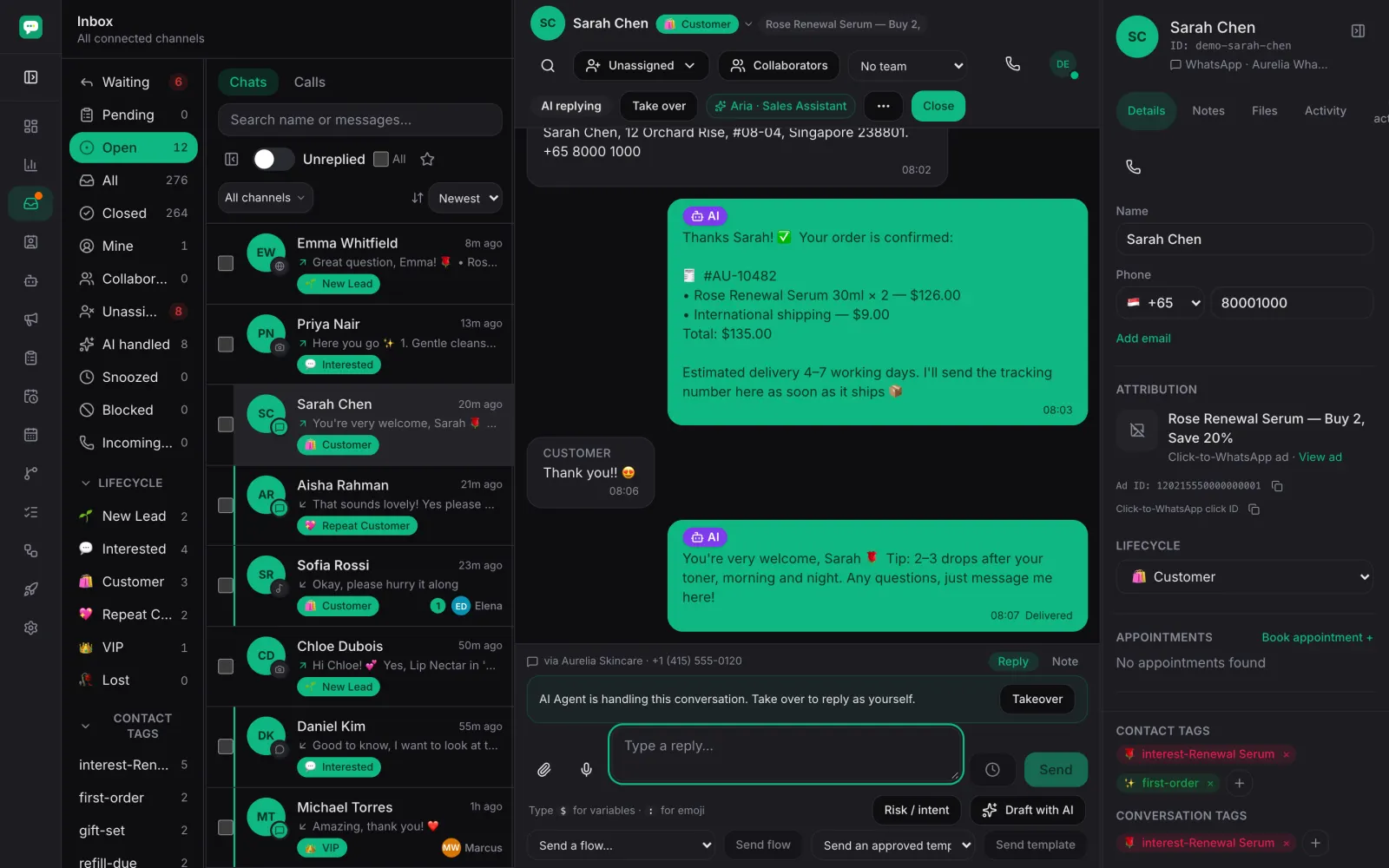
A click-to-WhatsApp or click-to-Messenger conversation arrives carrying its ad ID and click ID. Inchat records them on the contact, routes the thread by which ad it came from, and reports the lead back to Meta's Conversions API automatically — with no workflow to build first.
- Ad ID and click ID on every chat that came from one
- Leads sent to Meta's Conversions API automatically
- Route each ad to its own agent
What you get
Identifiers, from the first message
A click-to-WhatsApp or click-to-Messenger conversation arrives carrying its ad ID and its click ID. Both are recorded on the contact, so the thread is never an anonymous enquiry you have to guess about.
The lead goes back to Meta on its own
Inchat reports the lead to Meta's Conversions API as the conversation starts — there is no workflow to build first. Report the purchase later from a workflow step, when it happens.
Route people by the ad that brought them
Customers from different ads can meet different agents, different teams and different opening messages, because the routing reads the same identifiers.
See which sources start conversations
The sources report groups new conversations by where they came from, so the ad that fills the inbox and the ad that fills the pipeline can be told apart.
In every plan, not an add-on
Attribution, the automatic Conversions API report and per-ad routing are in the first tier. Reporting back needs a dataset on your own Meta asset, created with your own token during setup.
How it runs
Someone taps your ad
The click opens a WhatsApp or Messenger conversation, and Meta attaches the ad ID and the click ID to the first message.
Inchat records and routes it
Both identifiers land on the contact, and the routing rules decide which agent or team takes the thread.
The lead is reported automatically
As the conversation starts, the lead event goes back to Meta's Conversions API against your own dataset.
The outcome follows
When the sale lands, a workflow step reports the purchase — so Meta optimises on what actually closed, not on what merely replied.
Frequently asked
- Which ads does this cover?
- Click-to-WhatsApp and click-to-Messenger ads, the ones that open a conversation instead of a landing page.
- What identifiers arrive with the conversation?
- The ad ID and the click ID — the identifiers Meta matches on. Match the ad ID against your ad account to see which creative and campaign it belongs to.
- Do I have to build a workflow to report a lead?
- No. The lead is reported as the conversation starts, with nothing to configure beyond connecting your Meta assets. Purchases are reported from a workflow step, because only you know what counts as one.
- Is attribution restricted to a higher plan?
- No. Ad attribution, the automatic lead report and per-ad routing are in every plan, including the first.
Stop guessing which ad started the chat
Connect your Meta business and watch the next conversation arrive with its identifiers attached.