Start a WhatsApp Chat (new number)
Start a WhatsApp chat with a number the customer just gave you, using an approved template, since no messaging window is open yet.
Quick start
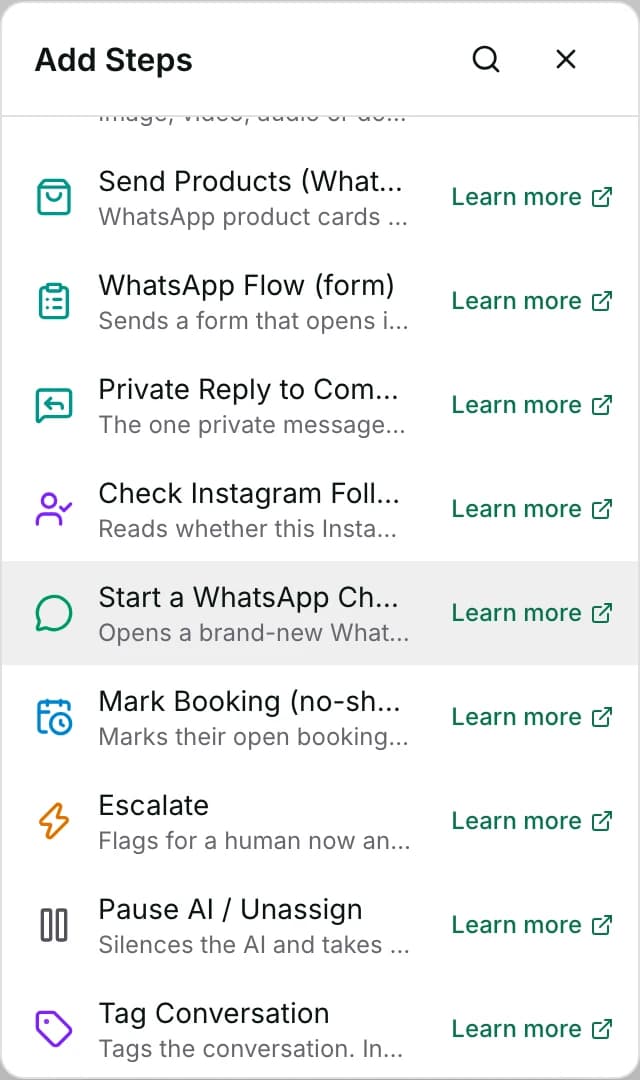
- Go to Automate → Workflows and open a workflow. Click + and pick Start a WhatsApp Chat (new number).
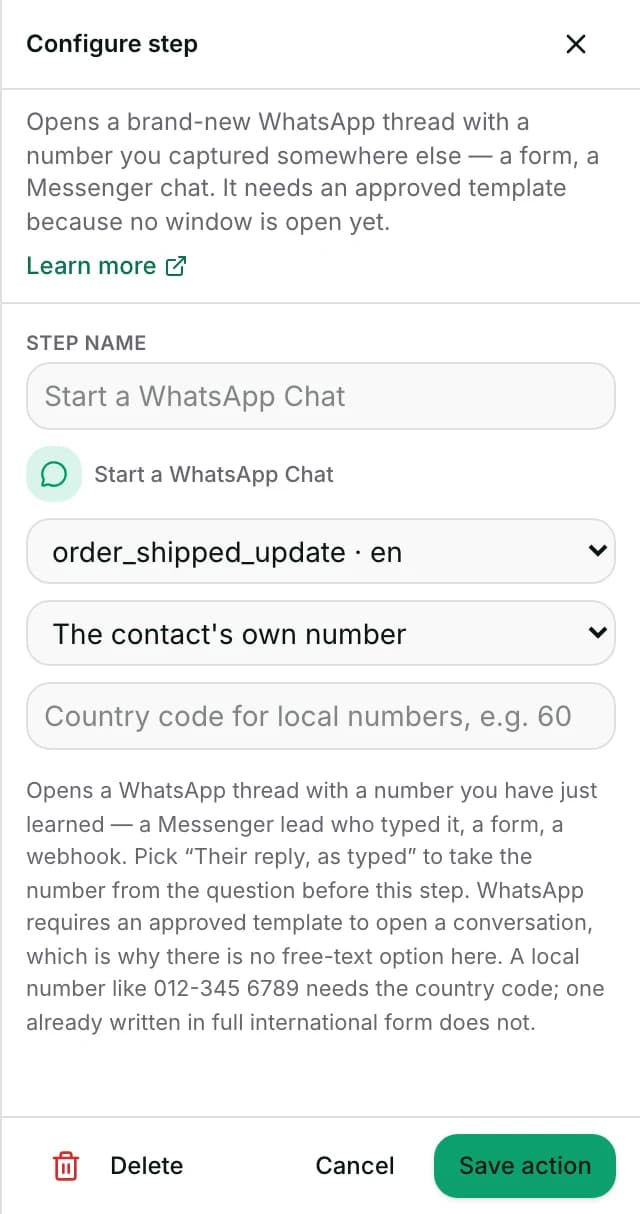
- Choose an approved opening template with no
{{1}}slots — Meta rejects a template sent with empty slots. - Keep The contact's own number or pick a field. A marketing template needs opt-in; any other number always does.
- If the number may arrive without a country code, set the country code, for example 60.
- Set Status to Published in the top toolbar, Save, confirm Publish. Agents: ask an owner or admin.
Watch out
- With two or more WhatsApp numbers connected, this step fails every run — it has no setting to choose which one to send from.
Details
Getting here
Automate → Workflows, open a workflow, click + on the canvas, then pick Start a WhatsApp Chat (new number) under Add Steps.
Before you start
- An owner, admin or agent can add this step and save the workflow. Only an owner or admin can publish it, and publishing is what makes it run on live conversations.
- Building and running workflows depends on your plan; see pricing.
- A WhatsApp channel connected to this workspace, and a template already approved by Meta on that number.
Set up
- Open the workflow and click + where the new chat belongs — typically right after the step that captured the number.
- Pick Start a WhatsApp Chat (new number).
- Choose the opening template from the list of approved templates.
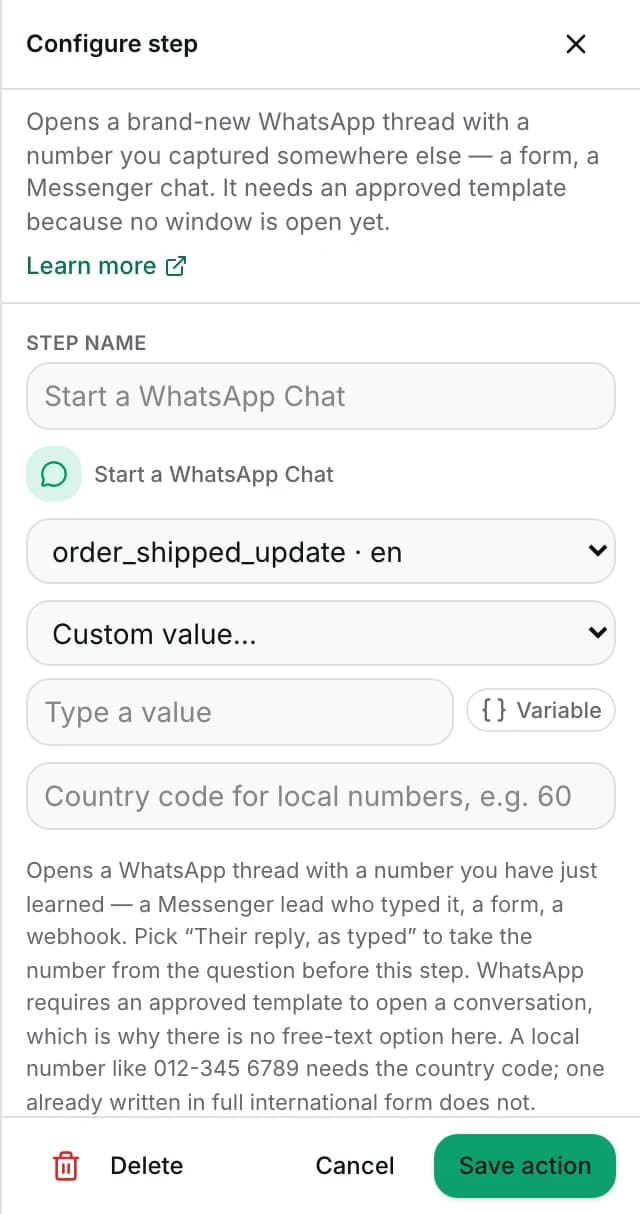
- Pick the number to reach: the contact's own number, or a field like their typed reply.
- If the number may arrive without a country code, set the country code (for example 60).
- Save the step. To publish: set Status to Published in the toolbar at the top of the editor, click Save, then confirm with Publish. The dropdown on its own changes nothing until you save.
Fields
- Template
- The approved template that opens the thread. See its body, and whether it has
{{1}}slots, under Settings → Templates. - Limits: Lists every template this workspace has synced as approved, the same workspace-wide list Send WhatsApp Template shows — not filtered to a particular WhatsApp number, and this drawer has no channel picker to narrow it.
- Number to reach
- The contact's own stored phone number, or a field value such as their typed reply.
- Default: The contact's own number
- Country code
- Used only when the number has no country code of its own — a local number like 012-345 6789.
- Limits: A number already written in full international form, with a leading +, does not need it.
How it works
- A number already written with a leading
+, or one long enough and not starting with0, is read as already international and used as-is. - Anything else needs the country code field, or the step fails rather than guessing which country a bare local number belongs to.
- The step may name a specific number — a field, not left on the contact's own. When that number is not the same person's own stored phone, it checks marketing consent for that number first: has it opted in, and not opted out since.
- It refuses to open the thread at all if not. That check asks for marketing opt-in whatever the template is, because the number may belong to a third party.
- Left blank, or set to a number equal to the contact's own, the step runs the consent check Send WhatsApp Template runs instead, read when the step runs.
- A marketing template, or one whose category is unknown, needs the contact's marketing opt-in. A utility or authentication template does not.
- It also reads the other records of this number: the WhatsApp record it sends to, and any record storing the number with or without the + (a Malaysian one also with a leading 0).
- A block on any of them stops every template, an opt-out on any of them stops a marketing template, and an opt-in on any of them counts.
- Consent lookups fail closed: a number this workspace has never recorded, or a lookup that errors, is treated as "not consented", never as "consent unknown, send anyway".
- Independent of consent, this step also caps how many new WhatsApp threads one conversation may open this way: at most 3 in a rolling day.
- That cap applies even when every one of them is the contact's own number.
- That cap is what stops a workflow loop from opening unlimited threads.
- That cap is spent on the attempt, not on a thread actually opening: it is checked and consumed right after the consent check, before the template-approval check or the send itself run.
- A run that fails afterwards — an unapproved template, a bad number, a send error — still counts against the cap, even though no thread ended up open.
- Once consent and the cap both pass, the step checks the chosen template is currently approved by Meta on the channel — the same approval check Send WhatsApp Template runs.
- A paused, disabled, rejected or still-pending template is refused before any thread is created.
- The contact and conversation are find-or-create, not always brand-new. A WhatsApp contact is looked up by this number on the chosen channel first, and reused if one already exists — its phone is filled in if it was missing.
- A new contact is only created when none matches.
- The conversation works the same way: an already-open conversation for that contact on this channel is reused rather than opening a second one alongside it. Nothing here treats the send as an inbound message, so it does not reopen or move any existing messaging window either way.
- This new WhatsApp contact is not automatically merged with whatever contact record the number came from — a Messenger lead, a form submission. They remain two separate contact records on the workspace unless merged some other way.
- The step's underlying data supports body variables and naming a specific WhatsApp channel, but the drawer offers neither — no variables list, no channel picker.
- A workspace with only one WhatsApp number never needs the picker. One with two or more fails every run of this step (see When it fails), because nothing in the drawer lets the author name which one to use.
- A chosen template with
{{1}},{{2}}… slots sends with no values in them when built through the drawer, and Meta rejects it. - Once the contact and conversation exist, the send (or the failed attempt) is recorded on that conversation as a reply from the workflow, so a thread this step opened is never left silently empty.
When it fails
- No number to reach: neither the step's own field nor the contact has one on file. The step fails with
no phone number on the step or on the contact. - The number cannot be resolved: an unusable string fails with a quoted explanation of what is wrong with it.
- A number lacking a country code, with none set on the step, fails with a message naming the fix — set a country code on the step, or provide the number in full international form.
- A named number that is not the contact's own has not consented to WhatsApp marketing: the step fails with
recipient has not opted in to WhatsApp marketing messages. - That happens before any contact or conversation is created — the thread is never opened.
- On the contact's own number, a marketing template with no opt-in on any record of the number fails with “Skipped: the contact has not agreed to marketing messages, and this is a marketing template.”
- On the contact's own number, a blocked record, or an opted-out one with a marketing template, fails with “Skipped: the contact opted out of marketing messages or is blocked.”
- On the contact's own number, a consent record that cannot be read fails with “Could not check the contact's marketing consent. Please try again.”
- In each of these three cases nothing is created and nothing is sent.
- This conversation has already made 3 attempts at this step in a rolling day, whether or not each one opened a thread: the step fails with
start_whatsapp send limit reached for this conversation today. - That message means the daily tries are used up.
- That check runs after consent, before the template check.
- This workspace has more than one connected WhatsApp channel and the step does not name one — the usual case, since the drawer has no channel picker.
- The step fails with a message naming the ambiguity, which nothing in the drawer lets an author resolve. A workspace with exactly one WhatsApp channel never hits this.
- The template is not currently approved: the step fails before any thread is created, carrying Meta's status reason — no half-open conversation is left behind with nothing said.
- The template send itself fails or cannot be confirmed after the contact and conversation were found or created: that conversation — new, or an existing one this step reused — still exists.
- The attempt is recorded on it with the failure reason, so an operator opening the thread later can see why nothing has been said.
- This step has no failure branch of its own; the run continues to the next step regardless of which of the above happened.
- The reason is in the workflow's Activity tab, under Execution log, on this step's line.
Limits
- No setting skips the consent check. The contact's own number needs opt-in only for a marketing template; any other number needs opt-in for every template.
- A record that stores the number with spaces or dashes, such as +60 14-338 7579, is not read unless the contact's own phone is written exactly that way.
- It cannot make more than 3 attempts per conversation in a rolling day, even to the contact's own number. A workflow that loops back to this step will start failing once that many attempts have run, whether or not each one actually opened a thread.
- It does not merge a newly created WhatsApp contact with the contact record the number came from. A Messenger lead who is opened as a new WhatsApp chat exists as two contacts afterward, not one, until merged separately.
- Though if this exact number already has a WhatsApp contact and an open conversation on the chosen channel, this step reuses them rather than creating a duplicate.
- It cannot open a chat with no template — every open needs an approved one, because no messaging window exists yet to send free text into.
- The drawer offers no channel picker and no template-variables list, though the step itself supports both. A workspace with two or more connected WhatsApp numbers cannot use this step at all through the drawer — every run fails on the ambiguity.
- A template built to take
{{1}},{{2}}… slots sends with them empty. - It cannot guess a country for a bare local number; a number with no country code and no country code field set fails rather than being sent to a guessed destination.
Best practices
- Capture the number right before this step — an Ask a Question, a form field — so the field you point this step at is fresh.
- Do not reach back several steps for a value that may have changed since.
- Set the country code whenever the source of the number is a form or a typed reply that might omit it — a Messenger-typed local number almost always will.
- Leave the number dropdown on The contact's own number whenever that is what you mean. A different number needs marketing opt-in even for a utility template.
- Use a utility template for an order or service message to someone who may not have opted in. A marketing template reaches only people who have.
Use cases
- A Messenger lead types their WhatsApp number to continue on WhatsApp; this step opens that thread with a welcome template.
- A web form captures a phone number for a callback request; a workflow opens a WhatsApp thread confirming the request was received.
FAQ and troubleshooting
- Does this step check marketing consent before sending?
- Yes, on every run. The contact's own number, which is the default, needs opt-in for a marketing template but not for a utility one. A number that is not theirs needs opt-in for any template. Either way, the template still has to be approved by Meta.
- Is the new WhatsApp contact linked to the Messenger (or form) contact the number came from?
- Not automatically. They are two separate contact records unless merged some other way. The one exception: if this exact number already has its own WhatsApp contact on the chosen channel, this step reuses that one rather than creating a new one.
- Why did the step fail with a country-code message?
- The number you pointed it at was not written in full international form and no country code was set on the step. Add one, or ask for the number in a format that already includes it.
- This workspace has two WhatsApp numbers. Which one does this step use?
- None reliably — the drawer has no channel picker, so with more than one WhatsApp channel connected the step fails every run, naming the ambiguity, and nothing in the drawer lets an author name one. This step only works as built through the drawer when the workspace has exactly one WhatsApp channel.
- Can I use this to message someone who already has an open WhatsApp conversation with us?
- You can, but it is built for a number with no thread yet — it always sends the approved template rather than checking whether a window is already open. Use Send a Message or Send WhatsApp Template on the existing conversation instead.
- Can this step open unlimited WhatsApp threads if I loop a workflow back to it?
- No. One conversation can make at most 3 attempts at this step in a rolling day, regardless of consent, which numbers are targeted, or whether each attempt actually opened a thread. The next attempt inside that window fails once the cap is reached.
Reading this with an AI assistant? Plain Markdown version.