Move Deal to Stage
Open or move this contact's deal to a pipeline stage, with an optional amount and a guard if someone has since moved it.
Quick start
- Go to Automate → Workflows and open a workflow. Click + and pick Move Deal to Stage.
- Choose the stage. If the dropdown is empty, first create a pipeline with stages under Pipelines.
- Optional: fill in the deal name and amount.
- Optional: under “Only if the deal is still in…”, type the stage it should still be in.
- Set Status to Published in the top toolbar, Save, confirm Publish. Agents: ask an owner or admin.
Watch out
- If the Amount placeholder does not resolve to a number, the deal saves without it — nothing shows in the run's Activity tab.
Details
Getting here
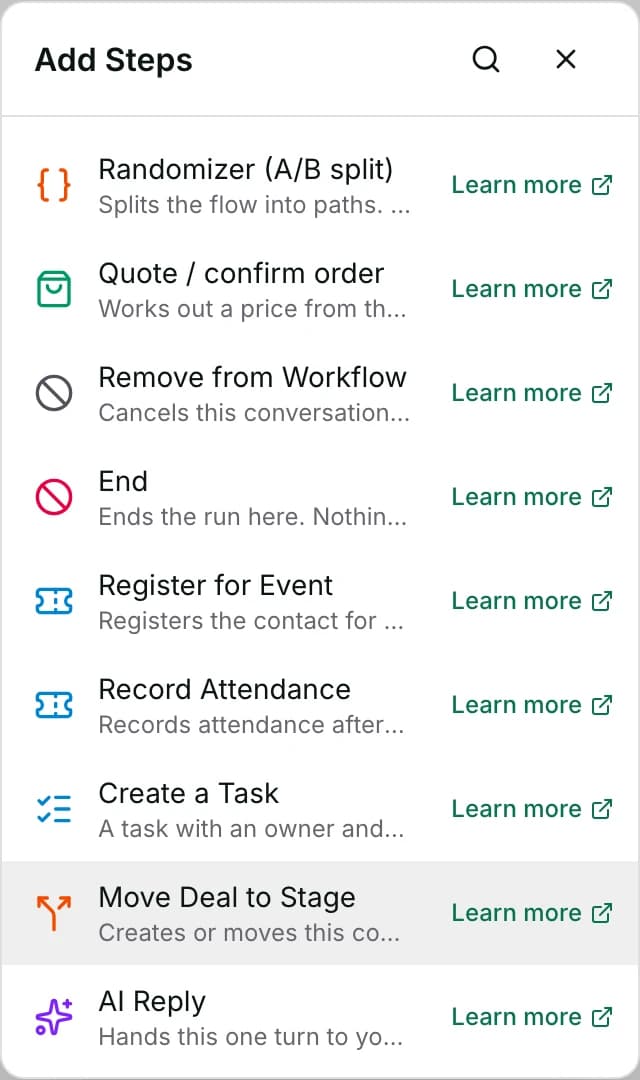
Automate → Workflows, open a workflow, click + on the canvas, then pick Move Deal to Stage under Add Steps.
Before you start
- An owner, admin or agent can add this step and save the workflow. Publishing that workflow — the thing that makes it run on live conversations — is an owner or admin action.
- Building and running workflows depends on your plan; see pricing.
- This workspace needs at least one pipeline with stages, created under Pipelines. The drawer says so when there is none yet.
Set up
- Open the workflow and click + where the move belongs.
- Pick Move Deal to Stage.
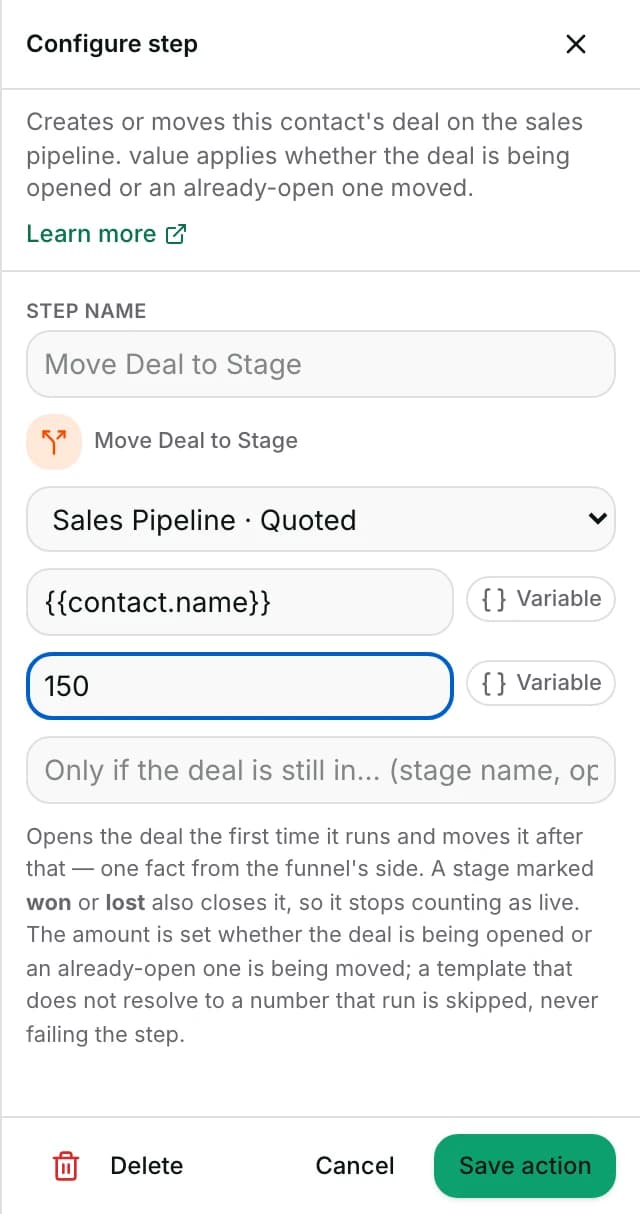
- Choose the stage from the Select a stage dropdown — it lists every pipeline's stages, shown as pipeline · stage name.
- Optional: fill in the field placeholder “Deal name when it is first opened” — used only the first time this contact's deal in that pipeline is created.
- Optional: fill in the field placeholder “Amount” — a plain number, or a placeholder like
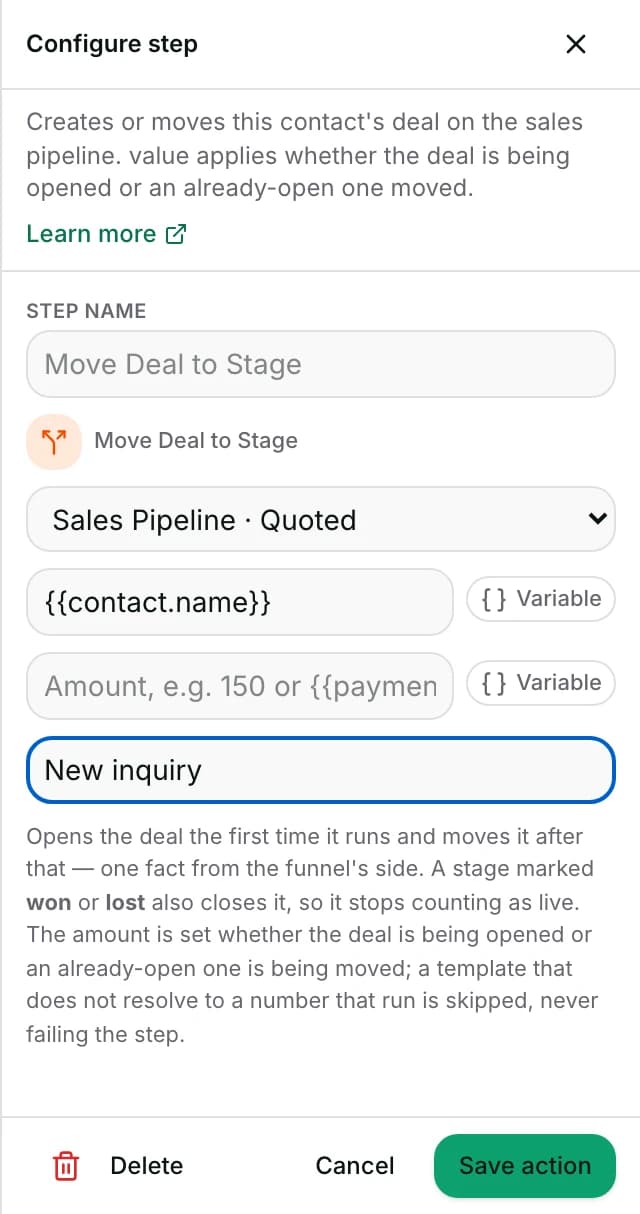
{{payment.amount}}, the amount read off a payment slip. - Optional: fill in the field placeholder “Only if the deal is still in… (stage name, optional)”, so the step does nothing unless the deal is still sitting where this flow left it.
- Save the step. To publish: set Status to Published in the toolbar at the top of the editor, click Save, then confirm with Publish. The dropdown on its own changes nothing until you save.
Fields
- Select a stage
- The pipeline stage to land the deal in. This is an unlabelled dropdown; “Select a stage” is its own placeholder option, not a field label.
- Deal name when it is first opened
- The deal's name. This is placeholder text inside an unlabelled box, not a printed field label.
- Default: “Opportunity”, if left blank
- Limits: Ignored when an already-open deal is being moved instead of created — there is no separate rename action.
- Amount (placeholder text, no printed label)
- The deal's value — a plain number, or a placeholder that resolves to one, like
{{payment.amount}}. Optional. - Limits: Applied whether the deal is being opened or moved. A placeholder that does not resolve to a number is skipped — logged on the server, but nothing shows in the run's own Activity tab. It never fails the step, and never clears a value the deal already has.
- Only if the deal is still in… (stage name, optional)
- Moves the deal only when it is currently in the named stage of the same pipeline, compared trimmed and without regard to case; otherwise the step does nothing and opens no new deal.
- Limits: Meant for a step placed after a Wait, where a person may have moved the deal elsewhere by then.
How it works
- The step resolves the contact behind this conversation, then looks for that contact's OPEN deal in the target stage's pipeline. If there is one, it moves it; if there is none, it creates one.
- You do not need to check whether the contact already has a deal there; the step does that for you.
- A contact can have at most one open deal per pipeline. The step never opens a second one for someone who already has one open there — it moves the existing deal instead, even if a fresh deal was intended.
- Moving to a stage marked won or lost also closes the deal, so it stops counting in every “still open” total on the board.
- Moving a deal to the stage it is already in does not make it look freshly moved — a re-run flow will not make a deal look newly stuck — though a supplied Amount is still written.
- With Only if the deal is still in… set, and the deal not in that stage (or no open deal at all), the step still records a reason rather than being a fully silent success.
- It shows as a ⊘ mark in the run's step list, with the reason as its tooltip — for example, “the deal is in ‘X’, no longer in ‘Y’ — nothing to move”. It never opens a new deal in this case.
- When the run started from a payment slip read on the customer's message, and the target stage is a won stage, the deal saves that slip's amount, reference and bank as proof.
- That only happens in that one case — a deal won by a keyword or a person's own judgement records no evidence.
- Moving a deal from a workflow step fires this workspace's Deal Stage Changed trigger for other workflows.
- Other workflows that start from that trigger can take up to about a minute to start — the same delay for the board's own edits and the AI agent's moves.
- So a pipeline can chain several flows together this way.
When it fails
- This conversation has no linked contact: the step fails with this conversation has no contact to open a deal for.
- No stage matches — nothing was named, the named stage no longer exists, or the same stage name exists in more than one pipeline. An ambiguous name fails rather than guessing.
- The step fails with the exact reason — for example, “more than one pipeline has a stage named ‘<name>’ — pick the stage instead of naming it”.
- Only if the deal is still in… cannot be checked because reading the contact's deal fails: the step fails with could not read this contact's deal.
- A database error opening a brand-new deal fails the step with could not create the deal.
- A database error reading which deal is open fails with could not read this contact's deals.
- A database error moving an existing deal to a different stage fails with could not move the deal.
- A database error updating only the Amount, on a deal already in the target stage, fails with could not update the deal's value.
- A failed move does not stop the run: the step shows as failed in the run's Activity tab and the flow moves straight to the next one, with the deal left exactly as it was.
Limits
- It cannot open a second deal for a contact who already has one open in the same pipeline — see How it works.
- The deal name only applies the first time a deal opens; this step cannot rename an already-open deal.
- The amount cap is the same the board's own editor enforces: no negative amounts, and a ceiling of one billion.
- A mis-resolved placeholder past that cap skips the write, rather than saving a number the board would refuse — and the operator is not told. It is logged on the server only, with nothing shown in the run's Activity tab.
- Only if the deal is still in… never opens a new deal when the condition is not met — it only ever guards a move.
- To stop loops, one deal can start the workflows that listen for it at most 6 times in a trailing hour.
- That cap only counts a move made by a workflow or an automatic rule — a person dragging the card, or the AI agent, does not count against it.
- A workspace-wide hourly ceiling applies on top of that. Past either cap, the extra moves make no further Deal Stage Changed trigger fire.
- A move that waits more than an hour to be checked — because the drain was down — is dropped, never fired late.
- It does not notify anyone of the move on its own — pair it with Assign To (human) or Add Comment if a person should be told.
Use cases
- Move the deal to Pending Payment and record the amount once a payment slip is read on the customer's message.
- A flow that quotes a deal, waits a day, then parks it as Dormant with Only if the deal is still in “Quoted”.
- That way, a deal a person already moved to Won or Lost in that day is left alone.
Reading this with an AI assistant? Plain Markdown version.